
At Doofinder, we power search for 10,000+ eCommerce stores. When someone asks “what is search as a service?”, we can answer it with data, not just definitions.
Search as a Service (SaaS search) is a subscription-based model for adding powerful search capabilities to your website or application without building or maintaining the infrastructure yourself. You get the search engine, the AI, the analytics, and the updates. Your team plugs it in and focuses on the business.
That’s the short version. Below is the honest long version: how SaaS search actually works, what it costs to build in-house instead, how the main providers compare, and what to look for before you commit.
What is Search as a Service?
Search as a Service is a cloud-hosted search solution delivered through a SaaS model. You pay a recurring subscription and get access to search infrastructure: indexing, query processing, relevance algorithms, analytics, and, in our case, AI-powered features, without running any of it yourself.
The key distinction from traditional search: with SaaS, you don’t manage servers, build relevance models from scratch, or hire engineers to keep the thing running. The provider handles the engine. You handle what to surface and for whom.
For eCommerce, that matters because product search is simultaneously complex and high-stakes. A shopper who types “blue running shoes under €80” expects the right results in under 200ms. Meeting that expectation in-house requires infrastructure investment most stores can’t justify.
How do SaaS Search Engines Work?
SaaS search engines operate seamlessly, employing advanced algorithms and indexing techniques to ensure efficient information retrieval. Here’s a closer look at how these engines are set up and integrated into a customer’s website:
1. Crawling and Indexing:
SaaS search engines begin by crawling through various data sources, which could include databases, websites, documents, or other digital content databases. During this process, the engine carefully indexes the content, organizing it into a structured database that allows for quick retrieval.
2. User-Friendly Query Processing:
When a user starts typing a search query, the engine swiftly processes the request. It retrieves relevant information from the search index, employing complex algorithms to analyze the query and match it with the most relevant results. The retrieved data is then presented to the user in a user-friendly format, ensuring a seamless search experience.
3. Multi-Index Search and Federated Search:
In more complex scenarios, especially for businesses dealing with diverse content categories, search SaaS engines employ a sophisticated approach known as multi-index search through federated search. For example, consider an eCommerce platform with products, blog posts, and collections. The search engine simultaneously queries separate indexes for these categories. This federated search method ensures that users receive distinct and relevant results tailored to their specific needs. This enhances the search experience by providing accurate information from different categories.
4. Integration into Websites:
Integrating a search engine as a service into a customer’s website is designed to be intuitive and user-friendly. Typically, the service provider offers easy-to-implement APIs (Application Programming Interfaces) or plugins that developers can integrate into the website. These APIs allow seamless communication between the website and the search engine, enabling real-time data updates and ensuring that users always access the latest information.
By employing these advanced techniques and seamless integration processes, SaaS search engines provide businesses with powerful tools to enhance their online presence, streamline user experiences, and ensure that users find precisely what they’re looking for, quickly and effortlessly.
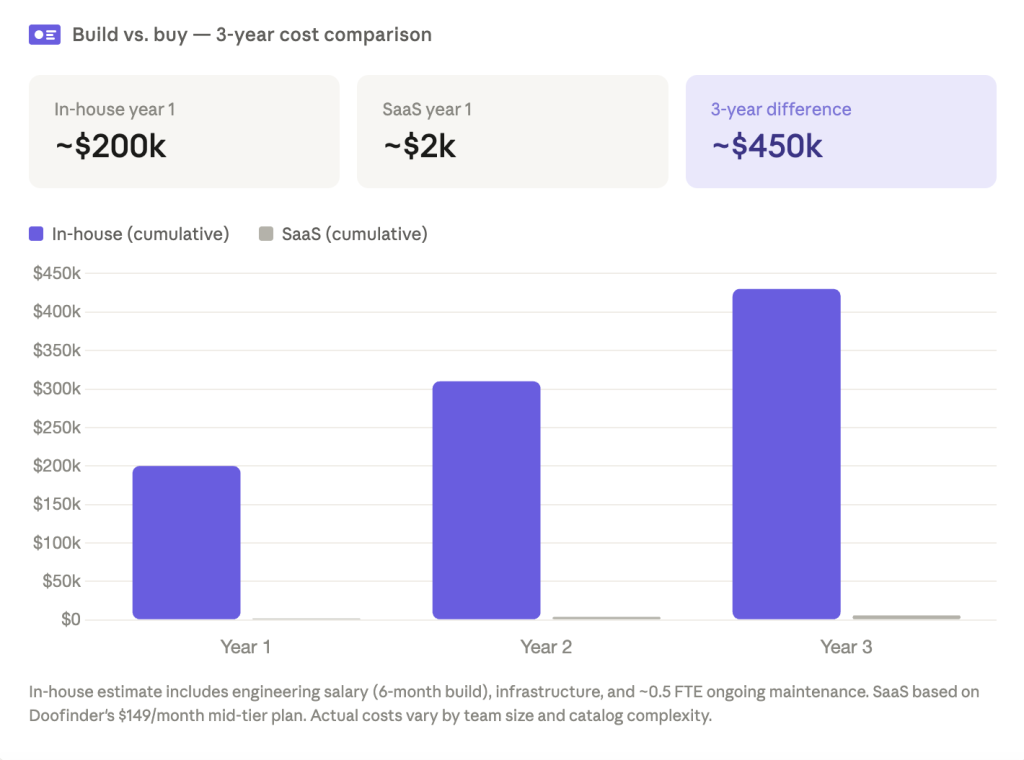
Build vs. Buy: The Real Cost of In-House Search
Most eCommerce managers who consider building search in-house underestimate what’s involved. Here’s a realistic breakdown.
Engineering time to reach v1: A functional site search with autocomplete, filters, and basic relevance takes a senior engineer 3 to 6 months to build. That’s before any AI layer, personalization, or analytics dashboard.
Infrastructure: Search at scale requires dedicated server capacity. A catalog of 50,000 SKUs with peak traffic around Black Friday needs a meaningful cloud allocation or dedicated hardware. Those costs don’t disappear once launch happens; they recur and grow with traffic.
Ongoing maintenance: Search relevance degrades as catalogs evolve. Someone has to tune synonyms, manage edge cases, handle zero-result queries, and update ranking logic when catalog structure changes. At most mid-sized eCommerce operations, that’s a recurring part-time engineering commitment.
Time to first impact: With a SaaS provider, most Shopify and WooCommerce merchants are live within hours. With an in-house build, the realistic timeline from decision to production is 6 to 12 months.
The bottom line: For most eCommerce stores, the engineering cost of building search in-house exceeds years of SaaS subscription fees. The result is a v1 search engine maintained by a team whose core expertise isn’t search, and that rarely outperforms a specialized platform.

Who Actually Needs SaaS Search?
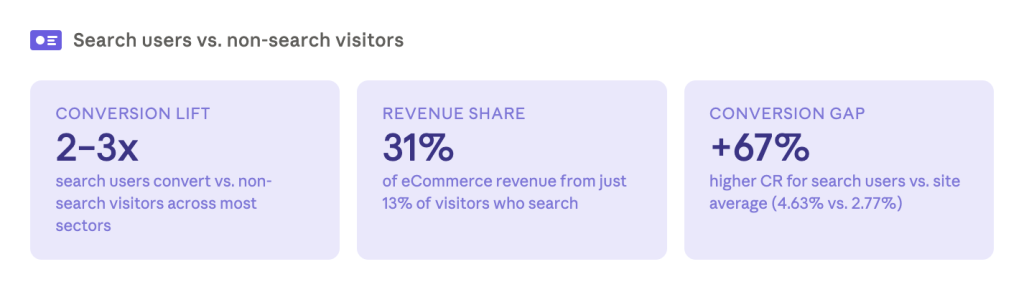
Any store where shoppers search and that experience is mediocre.
Signs your current search is costing you sales:
- Your zero-results rate is above 5%. The industry average is around 15%; Doofinder brings it below 1% for most clients.
- Shoppers search for products you carry and don’t find them.
- Your search bar returns nothing for common misspellings or synonyms.
- You have no visibility into what people actually search for.
- Mobile search converts poorly because the experience is slow or poorly structured.
The question isn’t whether you need better search. It’s whether the gap between your current experience and what’s possible is large enough to close with a search as a service solution. For most stores, it is.
Types of SaaS Search Engines
Effective information retrieval is the cornerstone of success for many companies. Search as a Service search engines have become essential tools, offering versatile solutions to meet diverse needs. Some SaaS platforms are designed as specialty search engines, focusing on specific industries or types of content to deliver highly relevant results.
Let’s delve into two primary types of SaaS search engines:
1. General-purpose (horizontal) search platforms
These are built to index and search almost any kind of content: documents, internal wikis, support tickets, product catalogs, whatever you throw at them. Providers like Elasticsearch (as a managed service) and Algolia in its broader form fall here. The strength is flexibility, since one engine can handle many use cases. The trade-off is that you often do the heavy lifting yourself, tuning relevance and building merchandising logic to adapt a generic engine to eCommerce-specific needs like variants, inventory, and pricing rules.
2. Specialized (vertical) search platforms
These are purpose-built for a single domain. In eCommerce, that means the platform already understands products, categories, variants, and shopper intent out of the box. Synonym handling is tuned for product names, merchandising rules are built for boosting margin items, and relevance models are trained on shopping behavior rather than generic text matching. Doofinder falls in this category, along with other eCommerce-focused providers.
The practical difference comes down to how much work lands on your team. A horizontal platform gives you raw search infrastructure and expects you to build the eCommerce logic on top of it. A vertical platform gives you eCommerce search behavior from day one, with less configuration and a shorter path to results. For most online stores without a dedicated search engineering team, that’s usually the deciding factor.
Benefits of Search Services
Search SaaS platforms offer a range of benefits that make them essential for modern businesses:
- Cost Efficiency: By leveraging SaaS, businesses significantly lower infrastructure costs and reduce the operational expenses tied to implementing and maintaining search functionality.
- Optimized Performance and Speed: These platforms use dedicated servers and are fine-tuned for speed, delivering quick, reliable search results that boost user satisfaction.
- Advanced Analytics: Search engines as a service provide valuable insights into user behavior, helping businesses better understand preferences and optimize search performance.
- Customizable Design: With flexible design options, businesses can tailor the search interface to create visually appealing and intuitive search experiences that align with their brand.
- Comprehensive Functionality: From basic searches to advanced filters and sorting, SaaS search solutions offer a broad range of features that meet diverse business needs.
- Customization and Flexibility: Businesses can fine-tune search functionalities to meet their unique requirements, ensuring that the search experience is tailored to both user needs and business goals.
- Agility and Scalability: Search SaaS engines are built to scale with your business, adapting seamlessly to growing data volumes and evolving business demands.
- Reliability: Designed for reliability, these platforms ensure consistent performance, even under high traffic, while scaling effortlessly to accommodate increased data.
- Wide Application Scope: Whether for eCommerce, research platforms, or content-driven websites, these platforms can handle large datasets and provide precise, relevant search results across various use cases.
- Personalization: With built-in personalization features, businesses can tailor search results based on user preferences and behavior, enhancing the user experience and driving higher engagement.
Search as a Service: How the Main Providers Compare
Search as a service isn’t one thing. Some providers hand you a full AI search and merchandising engine; others give you raw infrastructure and expect your team to build the eCommerce layer on top. Here’s the short version of how the main options differ:
| Provider | Best fit | Pricing model | eCommerce merchandising built in? |
|---|---|---|---|
| Doofinder | eCommerce stores wanting search, recommendations, and merchandising in one AI engine | Request-based tiers, from €49/month | Yes, native |
| Algolia | Teams with engineering resources who want a flexible, developer-first search API | Usage-based, per request and per record | Partial, requires configuration |
| Coveo | Large enterprises with complex, multi-source content beyond product search | Custom, volume-based, typically $30,000+/year | Yes, but built for broad enterprise search |
| Elasticsearch, Typesense, Meilisearch | Technical teams comfortable self-hosting or managing infrastructure | Free open-source, or resource-based cloud pricing | No, you build it |
For a deeper, feature-by-feature breakdown of how Doofinder stacks up against Algolia, Nosto, and other providers, see our full Doofinder alternatives comparison.
Best Practices for Implementing Search as a Service
Implementing Search as a Service (SaaS) can significantly enhance your website’s search functionality, providing users with relevant, fast, and intuitive search experiences. However, to ensure you fully leverage the benefits of Search as a Service, it’s essential to follow best practices during the implementation phase. Below are key steps and strategies to ensure seamless integration and optimization:
1. Choosing the Right SaaS Search Solution
When selecting a SaaS search platform, it’s crucial to evaluate your business needs to ensure the chosen solution aligns with your goals. Here are some factors to consider:
- Business Type: eCommerce websites might prioritize product search features, while content-heavy platforms (like blogs or news sites) may focus on categorizing articles or videos. Choose a solution that aligns with your specific content structure.
- Customization Requirements: Look for a platform that allows flexibility in customizing the search experience. If your business requires tailored filters, custom ranking, or specific integration with other services, ensure the SaaS platform supports these customizations.
- Scalability: Choose a solution that can scale as your business grows. Whether you are expanding product catalogs or growing your content library, the search solution should handle increased data volume without sacrificing performance.
- Integration Capabilities: Ensure the platform integrates seamlessly with your existing systems like CMS (Content Management Systems), eCommerce platforms, or databases. Check for available APIs or plugins for easy installation.
2. Integrating with Existing Platforms
Integration is a critical step to ensure your search engine works seamlessly with your website or application. Follow these steps to ensure smooth integration:
- API or Plugin Installation: Most SaaS search solutions offer easy-to-use APIs or plugins. For eCommerce platforms like Shopify, Magento, or WooCommerce, there are often pre-built plugins that can be quickly installed and configured without deep technical knowledge.
- Customization of Search Bar and UI: Customize the search box and user interface (UI) to match your site’s design and provide a cohesive experience. Customize the appearance, suggestions, and filters based on your brand’s needs.
- Data Indexing: Make sure the platform can index your data properly. Depending on the type of content or products you’re offering, the platform may need to crawl and index different sources (e.g., databases, product descriptions, articles, etc.). Review your platform’s indexing capabilities and ensure it handles your content effectively.
- Minimize Downtime: Plan the integration during off-peak hours, especially for large websites, to minimize disruptions. Testing the integration before going live is key to avoid downtime.
3. Optimizing Search Functionality
Once your SaaS search solution is in place, optimizing the search experience is key to delivering value to your users. These practices will improve both search accuracy and speed:
- Advanced Filters: Implement advanced filtering options to allow users to narrow down results by category, price range, date, or other specific attributes. This is especially important for eCommerce sites where users are looking for very specific products.
- Query Suggestions: Enable query suggestions or auto-completion in the search bar. This feature not only speeds up the user experience but also helps guide users toward relevant results even if they misspell or input vague queries.
- Faceted Search: Allow users to refine search results using facets such as product types, price ranges, and user ratings. This helps guide users to find exactly what they’re looking for quickly.
- Synonyms and Spell Correction: Ensure that the search engine supports synonyms and spelling corrections to improve the accuracy of results. This is particularly important for products or content that may be referred to in various ways.
4. Personalizing User Search Experience
Personalization enhances the relevance of search results by catering to individual user preferences. This can be achieved in several ways:
- Behavior-Based Customization: Track user interactions with the search results (clicks, purchases, time spent on specific products or content) and adjust search results accordingly. For example, you could prioritize items that users are most likely to purchase based on previous behavior.
- Geo-Targeted Results: Customize search results based on the user’s geographical location. For example, an eCommerce site can show products available in the user’s region, or a news site can prioritize local stories based on the user’s location.
- User Profiles: Use profiles or accounts to track preferences, such as past searches or preferred categories, and tailor results for logged-in users.
5. Monitoring and Analyzing Search Performance
To maximize the value of your Search as a Service implementation, ongoing monitoring and analysis of search performance are crucial:
- Search Analytics: Most SaaS search solutions come with built-in analytics tools that track user behavior, popular search queries, and conversion rates. Review these reports regularly to identify trends and areas for improvement.
- Optimize Based on Insights: Use insights from analytics to adjust search ranking, filter settings, or other parameters. For example, if certain queries are consistently returning irrelevant results, investigate and refine the indexing or ranking system.
- Track KPIs: Identify key performance indicators (KPIs) like search-to-purchase conversion rate (for eCommerce), bounce rate after search, or average time to find results. These KPIs can help you measure the effectiveness of your search implementation and make informed decisions.
6. Scalability and Future-Proofing
To ensure that your Search as a Service solution continues to meet your business needs as it grows, consider the following:
- Scalable Infrastructure: Choose a search platform that can scale with the growth of your product catalog, content, or website traffic. SaaS platforms are generally well-suited for scaling because they are hosted on cloud infrastructure, but it’s important to verify this with your provider.
- Keep Software Updated: SaaS search platforms typically provide continuous updates. Make sure your system is configured to automatically take advantage of these updates, which often include performance improvements, bug fixes, and new features.
- Evaluate Periodically: Regularly evaluate your search solution’s performance as your business evolves. This will ensure the search functionality adapts to new business models, data types, and user needs.
Doofinder: Leading the Way in eCommerce Search
At the forefront of SaaS search solutions, Doofinder stands out as a leading eCommerce search platform. Recognized as the top-ranking eCommerce search engine on G2 for Fall 2023, Doofinder specializes in simplifying the search experience for online businesses.
Zero-results rate. The average store has a 15% zero-results rate. Doofinder brings it below 1% for most clients. That’s the result of AI-powered synonym management, intent recognition, and behavioral learning applied to real eCommerce catalogs.
Merchandising is built in. You can boost high-margin products, pin seasonal items, configure campaign-based rules, and align search results with your business strategy directly from the admin panel. No code, no developer dependency.
Everything connects. Search, Recommendations, AI Assistant, and Category Merchandising run on the same AI engine. Behavioral signals from search improve recommendation quality. Category page performance benefits from the same relevance logic as search results.
Setup is fast. Most merchants using Shopify, WooCommerce, or PrestaShop are live within hours of installation.
With a focus on simplicity and effectiveness, Doofinder provides intuitive search solutions specifically tailored for eCommerce platforms. Its user-friendly interface and powerful algorithms ensure seamless integration, enabling businesses to optimize their search functions efficiently.
Doofinder’s success reflects its commitment to providing efficient and user-friendly eCommerce search solutions, making it a standout player in the competitive SaaS search industry.
Try it free for 15 days. No credit card required.
Frequently Asked Questions
For enterprise buyers, the most commonly evaluated options are Algolia, Coveo, and Doofinder. Algolia and Coveo are general-purpose platforms with strong enterprise feature sets. Doofinder is purpose-built for eCommerce. The best choice depends on whether your primary need is developer flexibility or out-of-the-box merchandising for an online store.
Pricing varies significantly by provider and model. Usage-based platforms (like Algolia) charge per query volume and index size, so costs can scale unexpectedly with traffic. Subscription-based platforms (like Doofinder) charge a flat monthly fee, ranging from $49/month for growing stores to $349/month for high-traffic operations, with enterprise pricing for larger catalogs.
For platforms with native eCommerce plugins, implementation is typically measured in hours. Custom or headless implementations take longer, usually 1 to 4 weeks depending on front-end complexity.
