Most online stores have a merchandising problem they don’t know they have. Their category pages sort products alphabetically. Their highest-margin items are buried on page three. Their search results and category rules contradict each other. Meanwhile, they’re spending more on acquisition and wondering why conversion rates won’t move.
eCommerce merchandising is what sits between traffic and revenue. Get it right and your store guides shoppers to the right product at the right moment. Get it wrong and you’re leaving money on the table at every touchpoint — quietly, invisibly, every day.
This article covers what eCommerce merchandising actually is, what it touches across your store, and what a functioning strategy looks like in practice.
What is Merchandising in eCommerce?
eCommerce merchandising is the set of decisions that controls what products appear where, in what order, and with what context — across every surface of your online store.
It’s the digital equivalent of physical shelf placement, but with one key difference: online, those decisions can be dynamic, data-driven, and automated. A physical retailer rearranges a shelf once a season. An eCommerce store can adjust product order, surface personalized recommendations, and pin high-margin items to the top of a category page in real time.
In practice, eCommerce merchandising covers:
- Which products appear first in search results and category pages
- How products are grouped, filtered, and sorted
- Which items get promoted on the homepage and in banners
- What recommendations show up on product pages, in the cart, and post-purchase
- How visual presentation — imagery, layout, badges — influences purchase decisions
At its core, it’s about connecting the right product to the right shopper at the right moment. Every page on your site is a merchandising decision, whether you’re making it intentionally or not.
eCommerce merchandising vs. traditional merchandising
Physical retail merchandising is constrained by space. You have a fixed number of shelves, a fixed store layout, and rearranging anything takes time and manpower. Personalization is impossible at scale — every customer walks the same aisles.
Online, those constraints don’t exist. Your “shelf” is infinite. You can feature any product in any combination across any part of the site — and change it in minutes, not weeks.
That flexibility is what makes eCommerce merchandising so powerful, and so underused. Most stores don’t treat it as a strategic discipline. They set up their platform defaults and move on.
Here’s what the online environment actually enables:
Unlimited placement. Any product can be featured anywhere — homepage, category pages, PDPs, cart, email, search results. There’s no shelf space limit.
Personalization at scale. What a shopper sees can adapt based on their browsing history, location, device, or purchase behavior — without extra effort per user.
Real-time iteration. Testing a different product order on a category page takes minutes, not a store reset. Results come in days, not months.
Data feedback loops. Every search query, click, and scroll tells you something. That data should feed directly back into your merchandising decisions.
What eCommerce merchandising actually covers
This is where most guides get vague. Merchandising isn’t one thing — it’s a discipline applied across every touchpoint in the store. Here’s what that looks like in practice.
Search results
When a shopper types “winter jacket,” what comes back first? If the answer is “whatever the algorithm decides,” that’s a problem. Smart merchandising layers business logic on top of relevance: surface high-converting products, pin items with strong margin, demote out-of-stock results. Search is the highest-intent touchpoint on your site — it deserves the most merchandising attention.
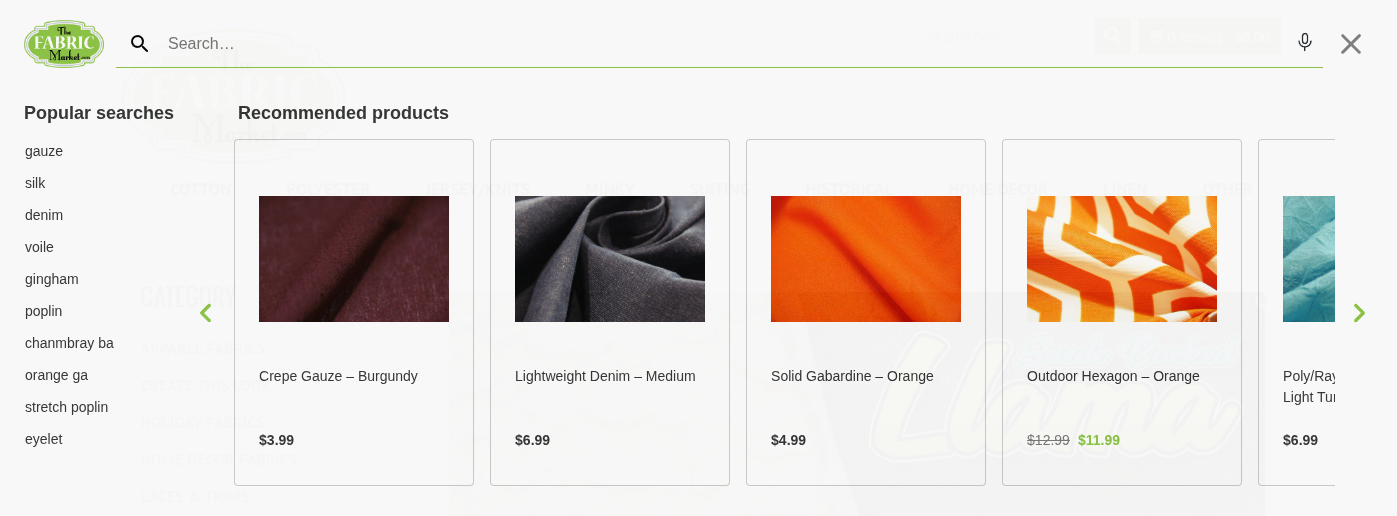
The Fabric Market surfaces recommended products directly in the search layer — turning a search interaction into an active merchandising moment. Read more about how to improve your website’s site search.
Category pages
Category pages are where most stores lose the most revenue — and where most merchandising effort is absent. Default sort order (often alphabetical or by product ID) is the enemy of conversion. The products a shopper sees first on a category page disproportionately influence what they buy. Controlling that order — pinning bestsellers, promoting high-margin items, demoting low-stock products — is one of the highest-leverage actions in eCommerce merchandising.
Tools like Doofinder’s Category Merchandising let you set those rules directly from the admin panel, without touching code. You define the logic — stock levels, margin, campaign priority — and the platform executes it automatically, across every category page on your site.
Homepage and banners
The homepage is your highest-traffic real estate. It should reflect your current business priorities: seasonal promotions, new arrivals, trending products. Most stores update it manually and infrequently. The opportunity is to make it dynamic — surfacing what’s relevant to each visitor rather than showing the same static layout to everyone.
Product recommendations
Recommendations aren’t just a “nice-to-have” widget. On product detail pages, they’re an upsell opportunity. In the cart, they’re a cross-sell. Post-purchase, they drive repeat orders. Each placement should have a clear business goal — higher AOV, margin protection, clearing slow-moving inventory — not just “show related products.”
Visual merchandising
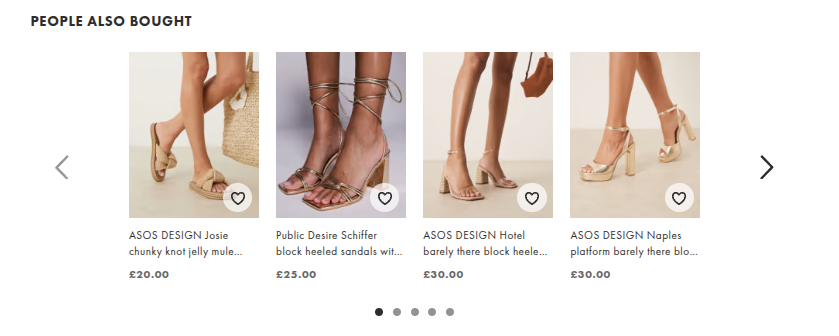
How products look on screen affects whether they get clicked. This means high-resolution imagery, consistent visual hierarchy, product badges (“Trending,” “Low Stock,” “New”), and layout decisions that direct attention. On category pages specifically, the visual treatment of the top results shapes perceived quality for the entire category.

How to build an eCommerce merchandising strategy
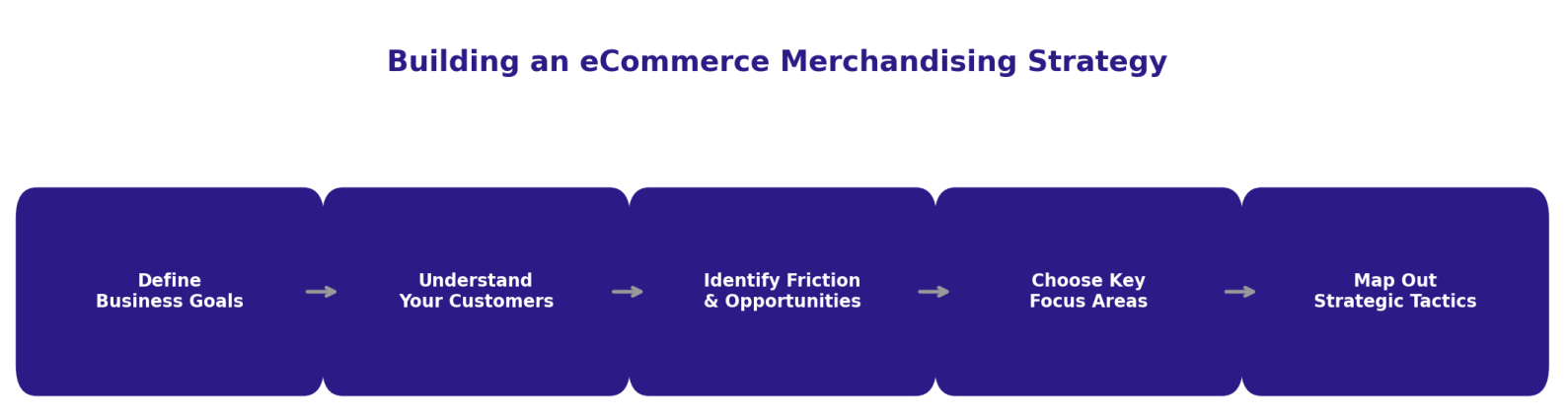
A strategy isn’t a list of tactics. It’s a framework that connects your business goals to specific merchandising decisions — and gives you a way to measure whether they’re working.
1. Define your business goals
Merchandising decisions without a goal are just guesses. Are you trying to increase conversion rate? Raise average order value? Clear seasonal inventory? Each objective points to different tactics. If AOV is the priority, lean into upsells, bundles, and cross-sells in the cart. If you’re moving end-of-season stock, that changes which products get pinned to category page tops.
Clear goals also make measurement straightforward: did this merchandising change move the metric it was supposed to move?
2. Understand your customers
Use what you have — analytics, heatmaps, search query data, purchase history. Look for patterns: which pages have high traffic but low conversion? What are shoppers searching for that isn’t surfacing well? Are there differences between mobile and desktop behavior that your current layout ignores?
Your search data is particularly valuable here. The queries shoppers type are a direct signal of demand — and a gap between what they search for and what appears is a merchandising failure.
3. Identify friction and opportunities
Friction is anything that interrupts the path from intent to purchase: confusing navigation, irrelevant category page results, a search bar that can’t handle synonyms or typos, recommendation widgets that show out-of-stock items.
Opportunities are the inverse: high-intent traffic that isn’t converting, high-margin products that aren’t getting visibility, searches that are generating clicks but no sales.
Map both. Your strategy should address the friction first — because removing barriers to purchase is faster revenue than adding new features.
Do you want to understand your customers better? Check out how to map the customer journey to well identify friction points.
4. Choose your focus areas
Prioritize by impact. Category pages and search results are almost always the highest-leverage starting points because they carry the most traffic and the most purchase intent. Homepage and recommendation widgets matter too, but they’re often refinements rather than foundations.
5. Map out your tactics — and measure them
Define what you’ll test, how you’ll measure it, and what success looks like. A merchandising strategy that doesn’t iterate isn’t a strategy — it’s a setup. Run A/B tests on category page sort order. Test different pinning logic. Compare the performance of recommendation placements across different page types.
eCommerce merchandising best practices
Leverage unlimited product placement
Unlike physical retail, you’re not choosing between featuring product A or product B. You can feature both — in different contexts, for different shoppers, at different stages of the journey. Use that flexibility deliberately. Cross-sells in the cart, upsells on the PDP, bestseller carousels on the homepage — each placement should earn its spot by contributing to a specific metric.
Implement dynamic personalization
Personalization adapts what each shopper sees based on their behavior — browsing history, location, device, previous purchases. At its most basic, it means returning visitors see products relevant to their last session. At scale, it means every category page and recommendation widget is individually tailored.
You don’t need a purchase history to personalize. Behavioral signals — what a shopper has clicked, how long they’ve spent on a product, what they’ve searched — are enough to start.
Control your category pages
This is where most MOFU-stage shoppers make decisions — and where most stores have the least merchandising control. Default sort order treats all products as equal. They aren’t. A category page that surfaces your bestsellers, in-stock items, and high-margin products at the top will convert better than one that sorts alphabetically.
Doofinder’s Category Merchandising gives eCommerce managers direct control over this without developer dependencies. Set rules based on stock, margin, or campaign priority. Pin products to specific positions. Apply the same logic site-wide or customize it per category. The setup takes hours, not weeks.
Optimize site search for conversions
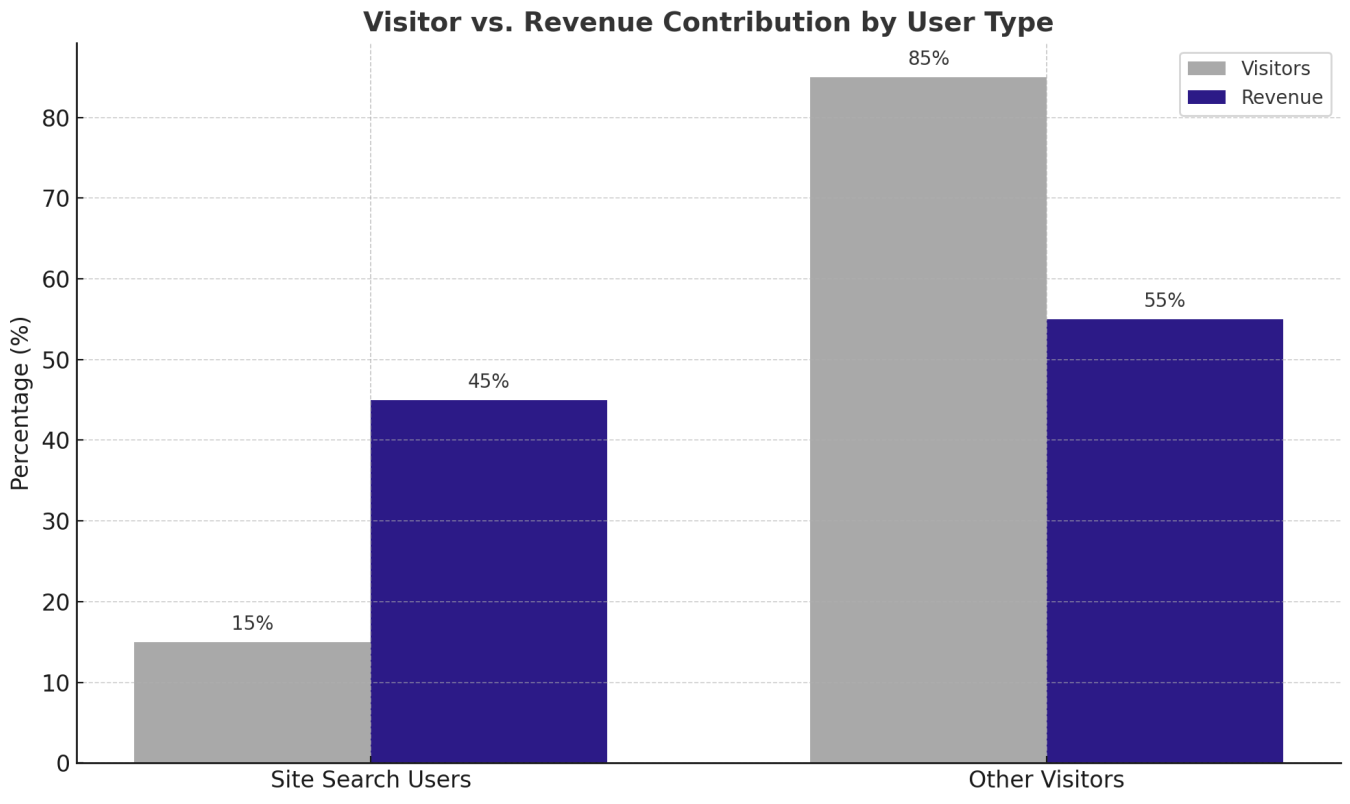
Site search users are your highest-intent visitors — and they punch well above their weight in revenue contribution. A search bar that can’t handle typos, synonyms, or vague queries is a direct revenue leak.
Smart search goes beyond keyword matching: autocomplete, error tolerance, synonym recognition, and personalized result ranking all contribute to turning search into a merchandising engine rather than a basic utility.
Test, then scale
One of eCommerce’s structural advantages over physical retail is the ability to run controlled experiments cheaply and quickly. Test category page sort order. Test recommendation placement. Test product badge copy. Don’t change everything at once — isolate variables, measure the impact, and scale what works.
Frequently Asked Questions about Category Merchandising
An eCommerce merchandiser is responsible for how products are presented, organized, and promoted across an online store. That includes managing category page logic, search result rules, promotional placements, and product recommendations — with the goal of increasing conversions and revenue. At smaller stores, this role is often held by an eCommerce Manager alongside other responsibilities.
Marketing drives traffic to your store. Merchandising determines what happens once shoppers arrive. Both matter, but they operate at different stages: marketing fills the top of the funnel, merchandising converts visitors into buyers. A high-traffic store with poor merchandising will underperform a lower-traffic store that gets product discovery right.
The core metrics are conversion rate (by page type), average order value, click-through rate on product placements, and zero-results rate on search. For category pages specifically, track position-weighted click data — which products are getting clicks at position 1–3 versus being ignored further down.
Visual merchandising in eCommerce refers to how products are presented visually — image quality, layout hierarchy, product badges, and how the overall visual design directs attention. On category pages, the visual treatment of the top results shapes how shoppers perceive the entire category, which directly affects click-through and conversion.
Searchandising applies merchandising logic to search results — controlling which products surface for which queries and in what order. Category merchandising does the same for category pages. The most effective strategies sync both: the rules that apply in search should be consistent with how category pages are organized, so shoppers get a coherent product discovery experience regardless of how they navigate.
What to fix first
If you’re looking for the fastest ROI on merchandising investment, start with category pages. They carry the most traffic after the homepage, they’re where most purchase decisions happen, and they’re almost universally under-merchandised. Default sort order is the most common and most expensive mistake in eCommerce.
From there, move to search. Look at your zero-results queries and your high-volume/low-conversion searches — those are the gaps your merchandising isn’t closing.
Both are fixable without a development sprint. Doofinder lets you control category page sort order, pinning logic, and search result rules directly from the admin panel — no code, no tickets, no waiting. If you want to see what that looks like in your store, try it free for 15 days.