
Most online stores run their product search on a standard relational database. That’s a big part of why the average eCommerce site has a 15% zero-results rate. Customers search, find nothing, and leave.
A search engine database is a different type of system entirely. It’s built to retrieve relevant results from large, unstructured datasets quickly, handling typos, synonyms, natural language, and relevance ranking in ways a regular SQL database simply can’t.
This article explains what a search engine database is, how it works, how it compares to a traditional database, and what to look for when choosing the right technology for your store.
What is a Search Engine Database?

A search engine database is a database built specifically to search through large volumes of unstructured or semi-structured data (product catalogs, documents, web pages) and return ranked, relevant results.
Unlike a traditional relational database, which retrieves exact records based on structured queries (think SQL: “give me all products where color = blue”), a search engine database is designed to handle ambiguous, natural language input. When someone types “cozy winter jacket under £100,” it has to figure out what they mean, match that against thousands of products, and return the best results in milliseconds.
The core technology that makes this possible is the inverted index, which is the same structure Google uses. More on that below.
A search engine database is also a type of NoSQL database, meaning it doesn’t require data to fit neatly into rows and columns. Product descriptions, customer reviews, tags, and metadata can all be indexed and searched together, which is exactly what eCommerce search needs.

The Difference Between Search Engines and Databases
A relational database (MySQL, PostgreSQL, and similar) stores structured data in tables with rows and columns. It’s excellent at exact lookups: retrieving a specific order, checking inventory levels, joining tables. It’s not designed for full-text search, and it falls apart quickly when you need ranking, fuzzy matching, or any kind of intent-based retrieval.
A search engine database is optimized for a different job entirely. Given an imprecise, natural language query, it returns the most relevant results from a large dataset, ranked by how well they match.
The practical differences side by side.
| Relational Database | Search Engine Database | |
| Best for | Structured data, transactions, exact lookups | Full-text search, relevance ranking, faceted filtering |
| Query style | SQL (exact match) | Natural language, fuzzy match, weighted fields |
| Handles typos | No | Yes |
| Ranking | No native ranking | Core feature |
| Scalability for search | Degrades with catalog size | Built to scale |
| Setup complexity | Relatively simple | Higher, though SaaS options reduce this considerably |
Most eCommerce stores need both systems running in parallel: a relational database to manage orders, users, and inventory, and a search engine database to power product discovery. One doesn’t replace the other.
How Does a Search Engine Database Work?

Let’s break down the magic of search-engine databases into easy-to-follow steps:
- Storing Search Engine Data as Documents
Unlike a relational database that splits data across tables, a search engine database stores everything about a product, article, or user profile in a single document. One product = one document, containing its name, description, category, attributes, and any other fields you want to make searchable. This structure is what makes retrieval fast.
- Analysis and Indexing
When documents enter the database, the engine processes them before any search happens. It reads the text, breaks it into tokens, strips stop words, applies stemming, and builds a search indexes — a map of every meaningful term to the documents that contain it. This pre-processing is what allows the engine to respond in milliseconds at query time, rather than scanning everything from scratch on every search.
The average eCommerce store has a 15% zero-results rate. Most of those failures aren’t missing products, they’re indexing and query-processing gaps. The product exists; the engine just can’t connect the query to it.
- User Queries Through a UI
Now, users come into the picture. They interact with the search engine through a Search User Interface (UI), just like typing a search into a bar. Their query is broken into small parts, like pulling words from a sentence.
- Using Indexes to Locate Relevant Documents
Armed with these indexes, the search engine starts its hunt for documents related to the user’s query. Picture it as flipping through a library index to find specific books based on keywords. Quick and spot-on.
- Determining Relevance with Algorithms
Retrieving matches is only half the job. The engine then scores each result using relevance algorithms, weighing term frequency, field importance (a match in the product title counts more than a match in the description), popularity signals, and behavioral data. The result the shopper is most likely to want appears first. Most search platforms let you tune these weights, boost specific products, or apply business rules on top of the base ranking.
The Main Database Search Engine Technologies Compared
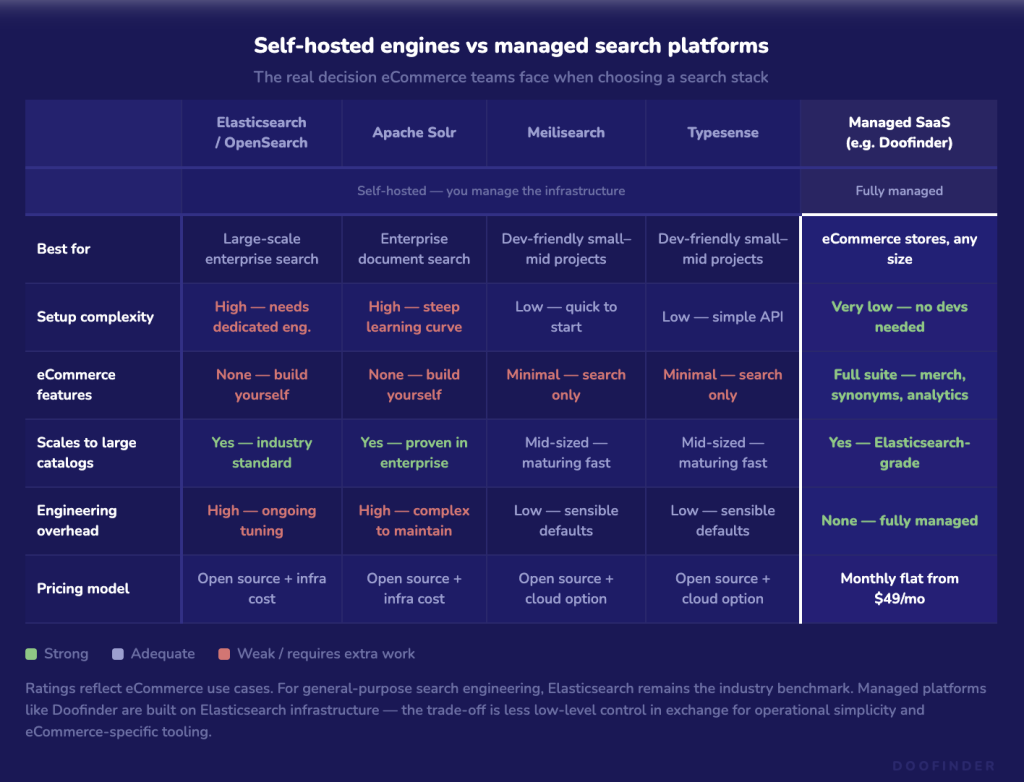
These are the most commonly used options, with honest trade-offs. The goal here is to help you understand the landscape, not to push a particular choice.
Elasticsearch / OpenSearch
The most widely deployed search engine database in production. Elasticsearch is distributed, scalable, and battle-tested across enormous catalog sizes. OpenSearch is the open-source fork maintained by AWS. Both are built on a Lucene-based inverted index.
Strengths: Mature ecosystem, excellent tooling, handles massive catalogs, strong analytics capabilities. Weaknesses: Complex to self-host and tune well. It requires dedicated engineering. Not a plug-and-play option for most eCommerce teams.
Apache Solr
Another Lucene-based engine, older than Elasticsearch. Still common in enterprise environments.
Strengths: Proven at scale, strong for document search and faceted navigation. Weaknesses: Steeper learning curve, and it’s lost ground in terms of active development momentum compared to Elasticsearch.
Meilisearch
An open-source engine built with developer experience as the priority. Written in Rust, fast to set up, with sensible defaults out of the box.
Strengths: Easy to get started, good fuzzy matching by default, clean API. Weaknesses: Less mature for very large catalogs (tens of millions of products), fewer advanced customization options.
Typesense
Similar positioning to Meilisearch: fast, developer-friendly, with a cloud-hosted option.
Strengths: Low latency, good typo tolerance, simple to integrate. Weaknesses: Smaller ecosystem, less enterprise adoption, fewer built-in merchandising tools.
Hosted / SaaS Search Platforms
This is where most eCommerce businesses actually end up, and for understandable reasons. Platforms like Doofinder sit on top of search engine database infrastructure (typically Elasticsearch-based) and add a layer that eCommerce teams can manage without engineering support: merchandising rules, synonym management, analytics, A/B testing, personalization, and zero-results handling.
You give up some low-level control. In exchange, you get operational simplicity and eCommerce-specific functionality that a raw Elasticsearch setup doesn’t include out of the box.
For a deeper, feature-by-feature breakdown of how Doofinder stacks up against other providers, see our full Doofinder alternatives comparison.
Features of Search Engine Databases:
1. Full-text Search

Traditional search engines might struggle with typos or imprecise queries, but not search engine databases. Imagine you’re searching for “costmes” instead of “costumes.” A search database ensures you still get relevant search results, making your search experience seamless and frustration-free.
2. Log Analysis

Search engine databases seamlessly index and store logs, allowing businesses to analyze search engine data effectively. For instance, you can track user interactions, identify patterns, and gain insights into how people navigate your site. This information empowers better business decision-making. It’s like having a digital detective that helps you understand user behavior and improve your website.
3. Speed and Efficiency

When you perform a search, waiting for results can be frustrating. Search engine databases are designed for speed and efficiency. Quick query response times and autocomplete suggestions make the search process not only fast but also user-friendly. Users get the information they need without unnecessary delays.
4. Search Algorithms
Search databases not only provide default algorithms that work for most cases but also allow businesses to customize them. Developers can fine-tune how search engine data is ranked and results are returned, tailoring the search experience to specific needs.
5. Developer Experience
Developers often face challenges when working with search databases. Search engine databases aim to simplify this. They come with built-in tools for common queries, support data replication to ensure data consistency and allow customization of scaling configurations. This allows them to focus on creating features that directly benefit users which leads to more efficient development and maintenance.
Emerging Trends: Where Search Engine Databases Are Heading
Vector search. Traditional keyword search struggles with natural language queries that don’t share exact terms with your product data. Vector search converts both queries and products into numerical representations (embeddings) that capture meaning, then finds matches based on semantic similarity. A search for “gift for someone who loves cooking” can return a quality knife set even if the product description doesn’t use those words. Most modern search platforms are adding vector search capabilities, either alongside or as a partial replacement for their keyword index.
Hybrid search. The current practical consensus is that combining keyword search with vector search outperforms either approach alone. Keyword search is precise for known-item queries like “Nike Air Max 270”; semantic search handles exploratory, open-ended queries better. Running both in parallel and blending the scores tends to give the best overall results.
AI-native ranking. A newer category where the ranking model itself is a neural network trained on your store’s behavioral data. Still maturing in production use, but the direction is clear: relevance ranking is moving away from hand-tuned rules and toward models that learn from how your customers actually behave.
Conversational search and the shift to natural language queries. Search bars used to be for keywords. Shoppers typed “black running shoes size 10” and expected exact matches. That’s changing fast. A growing share of queries now look more like questions or requests, “what should I wear hiking in cold weather” or “something waterproof but not too heavy for autumn.” These aren’t keyword queries; they’re conversations.
The search engine database infrastructure behind conversational commerce has to handle this differently. Natural language queries need intent recognition, context retention across turns, and the ability to narrow results through follow-up input rather than forcing the user to reformulate their search from scratch. This is where vector search and AI-native ranking converge with the front-end experience, the underlying database needs to be capable enough to support a back-and-forth exchange, not just a single lookup.
For eCommerce stores, this matters now. Shoppers who engage conversationally tend to have higher purchase intent and lower return rates, because they found something that actually fits their need rather than something that matched their keywords.
Importance of Search-Engine Databases: Empowering Developers and Users
Understanding the importance of search-engine databases reveals their impact on both developers and website visitors:
Streamlining Development for Faster Deployments
For developers, search-engine databases streamline the development process. By handling the complexities of search engine data organization and retrieval, developers can deploy applications faster. It’s like having a well-oiled machine that accelerates the development lifecycle.
Enhanced User Experiences
Website visitors benefit from search-engine databases through enhanced search experiences. They can find information quickly and efficiently without having to deal with the technical intricacies happening behind the scenes. It’s like enjoying a smooth, user-friendly navigation system that provides the desired results effortlessly.
Use a Search Engine Database to Improve Your Customers’ Search Experience
Many websites still rely on basic search engines, limiting user experiences. In the era of rising user expectations, a robust search engine database is the key to unlocking enhanced user experiences and streamlined development processes.
Enter Doofinder’s advanced search API – a solution designed to enhance search capabilities within any eCommerce website. Offering real-time results, intelligent typo handling, and cutting-edge voice and visual search, Doofinder offers advanced site search features for businesses of all sizes, adapting to their specific needs.
If you’re ready to redefine your search strategies and empower users, take the leap into the world of search-engine databases with Doofinder. Your users will thank you for it!
Frequently Asked Questions
A search engine database is a type of NoSQL database built to index and search large volumes of unstructured or semi-structured data, such as a product catalog, document library, or web content. Unlike a relational database, it uses structures like inverted indexes to return ranked, relevant results quickly, and it handles typos, synonyms, and natural language input as standard.
A traditional database stores structured data and retrieves exact records based on precise queries. A search engine database is built for relevance: given an imprecise or natural language query, it returns the most relevant results from a large dataset, ranked by how well they match. Most production eCommerce systems use both: a relational database for transactions and records management, and a search engine database for product discovery.
For self-hosted search at scale, Elasticsearch (or its open-source fork OpenSearch) is the industry standard. For smaller projects or teams that want a simpler setup, Meilisearch and Typesense are solid open-source choices. For eCommerce specifically, a managed search platform built on Elasticsearch infrastructure is often the better trade-off: you get the search quality without the operational overhead.
They index product data into an inverted index structure, which is a map of terms to the products that contain them. Fields like title, description, and tags are tokenized, normalized, and stored in a way that allows fast lookup by query term. Filterable attributes like price, color, and size are stored separately and applied at query time to narrow down results.
A different use case entirely. Services like Have I Been Pwned let you check whether an email address appears in a known data breach dataset. The underlying technology is similar (a search engine database indexing structured breach data), but the purpose and data are completely unrelated to eCommerce search.
Traditional keyword search matches terms between the query and your index. Vector search converts both queries and products into numerical representations that encode meaning, then finds products whose meaning is closest to the query, even when there’s no exact keyword overlap. A search for “breathable summer running top” can match a “lightweight performance tee” even if the product description doesn’t use any of those words.
