
Most conversion rate advice focuses on checkout, pricing, or ad creative. But for the majority of eCommerce stores, the bigger revenue leak sits much earlier — in the moment a shopper searches or browses and doesn’t find what they need.
If you’ve ever looked at your traffic numbers and wondered why they don’t translate into revenue the way they should, the answer is usually somewhere in your search and browse experience.
Shoppers are landing. They’re looking. They’re just not finding.
This guide covers the two connected problems behind that — findability and discoverability — and the practical steps you can take to fix both without touching your prices, your checkout, or your ad spend.
First: what’s the difference between findability and discoverability?
They sound like the same thing. They’re not — and the distinction matters because the fixes are different.
Findability is about shoppers who know what they want. They type it into your search bar and expect results. The problem is whether your store can understand what they typed — even with a typo, a synonym, or a regional word you don’t use in your catalogue.
Discoverability is about shoppers who are exploring. They’ve found something close — a jacket that’s almost right, a shoe in the wrong colour — and now they need to be shown alternatives. They’re open to buying. The question is whether your store keeps them moving or lets them hit a dead end.
Both are conversion problems. Both happen before checkout. And 68% of shoppers report being unhappy with on-site search — most of them don’t give it a second try.
How to improve eCommerce findability
1. Fix your spelling and typo handling
This is the most mechanical problem and the most immediate to fix. Roughly 30% of eCommerce search queries contain a spelling error or typo. On a default platform search engine, a significant portion of those return zero results — not because the product doesn’t exist, but because the system can’t recognise what the shopper meant.
The solution is spell correction: the engine interprets “treiners” as “trainers”, returns the right results, and the shopper never notices the correction happened. No dead end, no frustrated bounce, no lost sale.
Start here: take your 20 most common search terms and deliberately mistype them in your own search bar. You’ll almost certainly find failures you didn’t know existed. For a full breakdown of what zero-result pages cost your store, read this article.
2. Build out your synonym coverage
Different shoppers use entirely different words for the same product. A UK shopper types “lead”, a US shopper types “cable”. Someone looking for a waterproof jacket might type “cagoule”, “rain mac”, “windbreaker”, or “anorak” — all describing the same thing, all potentially returning zero results on a catalogue that uses none of those terms.
For international stores, this problem multiplies across regional vocabulary, dialect differences, and translated terms.
The fix is synonym mapping — a layer that understands which terms belong to the same result set and handles the translation invisibly. When it’s working, there’s no wrong word. Every term a shopper uses leads somewhere useful.
How to audit your synonym gaps: pick your top 10 product categories and search for five alternative terms for each — slang, regional words, common abbreviations. Note where you get zero or irrelevant results. Those gaps are individual revenue leaks that compound across your entire catalogue.
3. Make autocomplete do real work
Most stores treat autocomplete as a time-saving feature. It’s actually a steering mechanism — and the most underused one in eCommerce search.
When a shopper starts typing, they’re at their most uncertain. Intent exists, but they haven’t committed to a specific query yet. Good autocomplete guides them toward searches your catalogue can actually answer well. It surfaces trending and popular queries. It shows product thumbnails before the shopper hits enter. It keeps momentum going at exactly the moment most searches stall.
Shoppers who land on a strong result set on their first search convert significantly better than those who have to refine and retry. Autocomplete is the thing that makes the first search count.
4. Check your zero-results rate
This single metric is one of the clearest signals of findability health in your store. The industry average on default platform search sits at 8–15% — meaning up to 1 in 7 searches returns nothing.
If you don’t currently have visibility into this number, that’s itself worth fixing. Most advanced search platforms surface it in their analytics dashboard. Once you can see it, you can prioritise the highest-volume zero-result queries and address them one by one — adding synonyms, fixing catalogue terms, or creating custom result sets for specific queries.

Doofinder’s Insights dashboard surfaces your top zero-result queries automatically — ranked by volume, flagged for action. No digging through analytics. You see exactly which searches are failing and fix them in a click.
How to improve eCommerce discoverability
5. Add “more like this” at the product level
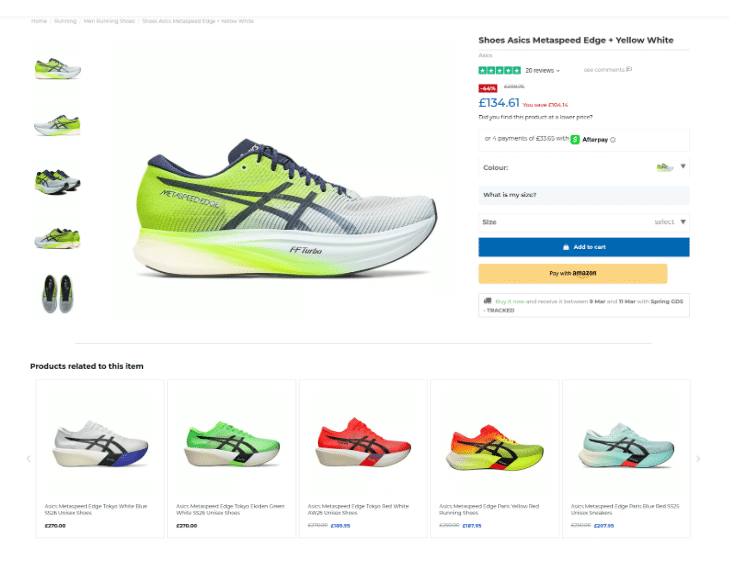
When a shopper lands on a product that’s almost right but not quite, the best thing you can do is show them something similar — immediately, in context, without making them go back to search.
Not generic cross-sells. Not “customers also bought” that drifts into unrelated categories. Products that match on the attributes that actually matter for that shopper: style, category, price range, material.
Done well, this removes the need to re-search entirely. The next viable option is already visible. The shopper stays in motion rather than exiting to start over — or just exiting.
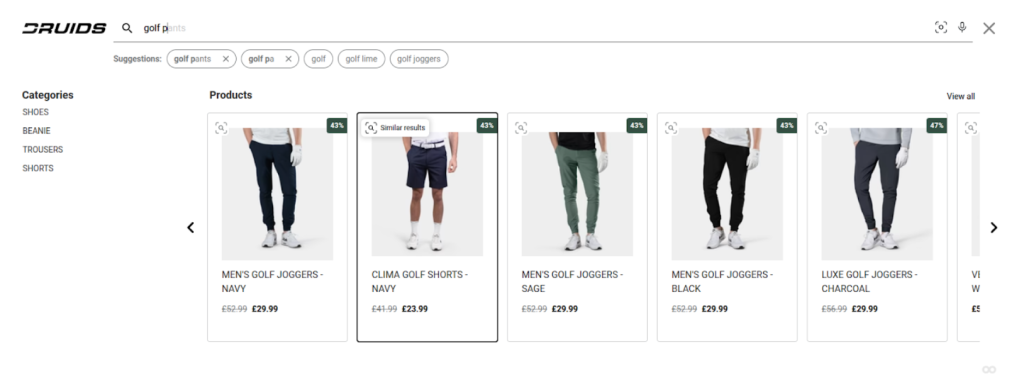
Doofinder surfaces visually similar products directly in the search results — the shopper who liked the navy shorts but wanted something different has five relevant alternatives already in front of them, without going back to search.
6. Use visually similar recommendations for visual categories
For fashion, home décor, and any category where how something looks is the primary decision factor, visual similarity is a more powerful discovery signal than attribute matching.
A shopper looking at a brown leather bag who sees visually similar alternatives — same silhouette, comparable price point, slightly different shade — stays engaged in a way that text-based recommendations often don’t replicate. The connection is immediate and intuitive. They don’t need to articulate what they’re looking for; they just recognise it when they see it.
7. Surface behaviour-based signals alongside product data
Beyond what products share in terms of attributes, there’s what real shoppers have actually done on your site. “People also viewed” and “frequently browsed together” reflect genuine intent patterns from your customer base — connections that wouldn’t emerge from product data alone.
These signals are particularly useful for revealing non-obvious pairings: products from different categories that consistently get viewed together, or items that shoppers look at immediately after rejecting a specific product. That’s real demand intelligence, and it feeds directly into discovery.
8. Fix your category page ranking logic
Discovery doesn’t only happen at the product level. 65–70% of shoppers browse category pages rather than using search — which means how you rank products within categories is itself a major discovery lever.
Most stores default to “newest first.” This actively buries your bestsellers. Shoppers browsing a category see your most recently added products regardless of their quality, relevance, or conversion history — which means the products most likely to result in a sale are often the furthest from view.
Ranking by popularity, conversion rate, or seasonal relevance keeps the right products visible to the most exploratory shoppers. And it needs to adjust dynamically — as stock changes, as seasons shift, as demand patterns evolve — rather than being a one-time manual configuration.
The four-point audit
If you want a quick read on where your findability and discoverability stand right now, these are the most direct things to check:
Zero-results rate — if yours is 8% or higher, you have a measurable, fixable revenue leak. Start with the highest-volume zero-result queries and work down.
Synonym coverage — search for 10 alternative terms across your top categories. Note every dead end. Each one is a gap that compounds across thousands of sessions.
Product page exit rate — if shoppers are landing on product pages and leaving without clicking elsewhere, you likely have a discovery gap. Nothing is keeping them in motion.
Category page ranking — check your top three category pages. If they’re sorted newest-first, your browse experience is working against you.
What improving both actually moves
Findability and discoverability aren’t separate workstreams — they’re two stages of the same shopper journey. A shopper who can’t find what they’re searching for never reaches discovery. A shopper who finds something close but can’t discover the right alternative exits at the product page.
Either failure means a lost sale that doesn’t show up as checkout abandonment, doesn’t get caught by retargeting, and doesn’t improve with more ad spend. It’s invisible in most analytics setups — which is part of why it persists.
Fixing both — search that handles natural language properly, and browse experiences that maintain momentum — is the highest-leverage conversion work most eCommerce stores aren’t doing.
Going deeper
This covers the first two layers of the eCommerce conversion picture. But there are two more that go beyond findability and discoverability — what signals belong directly inside your search results to help shoppers decide faster, and how to turn your own search data into a prioritised conversion roadmap.
Both are covered in detail in the guide, alongside the data behind what these changes actually move in practice.