A shopper types “shoes that won’t hurt after a full shift on my feet” into your search bar. Your catalog has exactly the right product: a cushioned, slip-resistant sneaker built for people on their feet all day. Nothing shows up. Nothing in your product titles says “won’t hurt” or “full shift.” The shopper leaves, and you never even see that search fail.
That’s the gap vector search closes. Here’s what it actually is, how it’s different from what most stores run today, and whether it’s worth adding to yours.
What is vector search
Every product and every query gets converted into a list of numbers, called a vector, that represents its meaning rather than its exact words. Two products with similar meaning end up with similar numbers, even when they don’t share a single word in their titles.
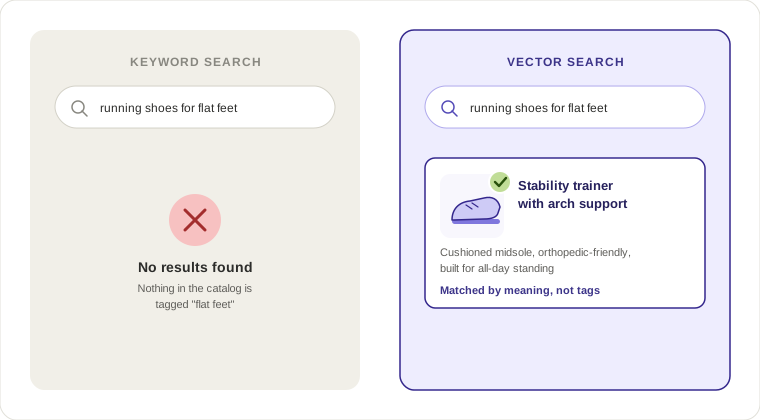
That’s how “running shoes for flat feet” can match a product titled “Stability Trainer with Arch Support.” No product is tagged “flat feet.” The vector search engine isn’t matching text. It’s matching meaning.
This is the core difference from keyword search, which only checks if the words in a query show up somewhere in your product data. It’s also different from generic “semantic search,” a broader term that can include synonym expansion and typo correction without using vector embeddings at all.

Vector search vs vector database: not the same thing
People mix these up constantly, so let’s clear it up. A vector database is where the vectors live. It’s the storage and indexing layer, the thing that holds millions of embeddings and lets you query them fast. Vector search is what you do with that database: the actual act of comparing a query’s vector to everything stored and pulling back the closest matches.
You need a vector database to run vector search at any scale. But owning a vector database doesn’t automatically mean your search understands intent. Plenty of teams set one up, plug in a generic embedding model, and still get mediocre results because the model wasn’t tuned for how shoppers actually talk. Vectors also aren’t the whole story: most search engines pair them with metadata search, the structured product data (price, brand, stock) that filters and constrains results alongside meaning.
Semantic search vs vector search vs keyword search vs hybrid
| Approach | How it works | Example query | What it returns | Main limitation |
|---|---|---|---|---|
| Keyword search | Matches exact words or close variants in product text | “Nike running shoes” | Products containing those exact words | Misses intent based or descriptive queries |
| Semantic search | Expands queries with synonyms, plurals, typo correction | “sneaker” also matches “trainer” | Broader but still word based matches | Falls short when the query describes a need, not a product name |
| Vector search | Converts query and products into embeddings, matches by meaning | “running shoes for flat feet” | Stability trainers with arch support, regardless of tags | Can be less exact for SKU or brand lookups |
| Hybrid search | Combines vector matching with keyword precision | “Adidas Gazelle size 42” | The exact product, fast and precise | Needs both systems tuned to work together |
Here’s the pattern worth remembering. Pure vector search is great at understanding what someone means but can lose precision when a shopper already knows exactly what they want. Pure keyword search is fast and exact but blind to intent. They work best when ran together.
Where a vector search engine actually earns its keep
A few query patterns make the value obvious:
- “Gift for a coffee lover under $30” has no product tagged “coffee lover.” Vector search connects the concept to mugs, grinders, and coffee accessories that fit the price range.
- “Something similar to AirPods but cheaper” is a comparative query. There’s no keyword to match on “similar to” or “cheaper” alone. The engine has to understand the reference product and the constraint together.
- “Office wear that’s comfortable and durable” is the kind of query we see constantly in Doofinder’s AI Assistant conversations, where shoppers describe a need in their own words instead of a product category.
None of these are edge cases. This is how people actually search when they’re not thinking in catalog terms, which is most of the time.
How to implement vector search for your store
There’s more than one way to get here, and it’s worth knowing the tradeoffs before you commit engineering time or budget to any of them.
Build it yourself. Pick an embedding model, stand up a vector database, write the pipeline that keeps embeddings in sync with your catalog, and build the retrieval logic that blends vector results with keyword matches. This gives you full control over the model and the ranking logic. It also means your team owns the maintenance: re-indexing when products change, monitoring latency, and scaling the database when traffic spikes. For a store with an in-house engineering team and a genuinely unique catalog (huge scale, unusual product data, specific ranking needs), this path can make sense.
Use a vector database as infrastructure, plug in your own logic on top. This is the middle path. Services like Pinecone or Elasticsearch’s vector features handle storage and similarity search, but you still write the integration layer that connects your product feed, triggers re-indexing, and merges vector results with keyword results. Less work than building from zero, but still a development project with ongoing upkeep.
Use an eCommerce search platform that includes vector search out of the box. This is the plug-and-play route: connect your store, and the platform handles embedding generation, indexing, catalog syncing, and the blend between vector and keyword matching, without your team writing or maintaining any of it. With Doofinder, you still get freedom to customize the layout to your own store.

Which path makes sense depends on your team and catalog. Ask yourself: Can you handle ongoing re-indexing and infrastructure maintenance? And do you need to customize the model, or just want search that understands your customers?
Doofinder takes the no-code route. Connect your store, and it handles embeddings, indexing, and search infrastructure for you—so your team can focus on your product, not maintaining search.
Do you need vector search for your store
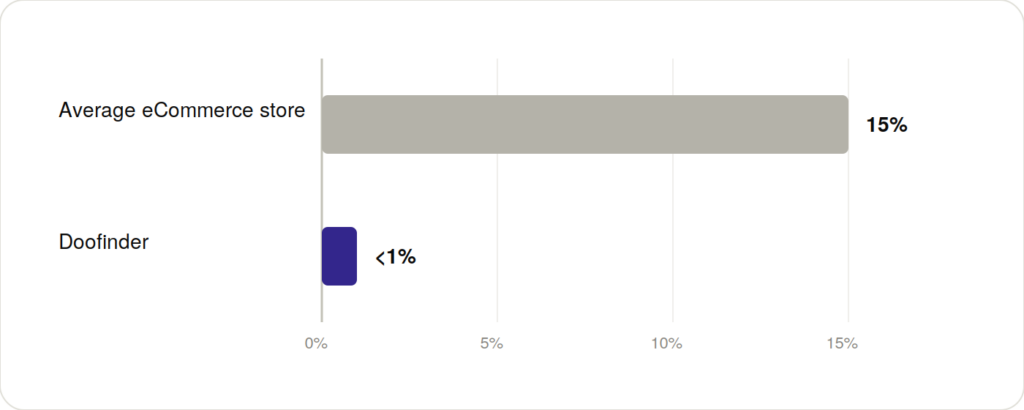
If your catalog has any real depth and your customers ever type full sentences instead of exact product names, yes. The zero-results page is where you quietly lose these people, and it happens more than most store owners realize. The average store has a 15% zero-results rate. Stores running Doofinder on average bring that below 1%.
TooTimid saw this play out directly. Irrelevant results were burying the products customers actually wanted, and that friction was showing up as a real zero-results problem. After switching to Doofinder’s relevance-first search, zero-results queries dropped to 0.7%, and the improved discoverability pushed conversion rate to 10.3%, lifting revenue 7.1%.
Better synonym lists and manual redirects don’t close that gap at scale. Search that understands the query even when it doesn’t match the catalog text does.
Where vector search alone falls short: someone typing an exact SKU, a specific brand, or a model number wants precision, not interpretation. That’s the case for hybrid search over pure vector search, and it’s a big part of why the best-performing eCommerce search platforms combine approaches instead of betting everything on one.
Where conversational AI assistants fit in
Vector search answers a single query. A conversational assistant carries that same understanding through a back-and-forth exchange, the kind where a shopper says “office wear” and then narrows it down with “comfort and durability” without ever typing a full search string.
This is the shape Doofinder’s AI Assistant takes. Rather than just returning a ranked list, it asks a follow-up when a query is too broad, pulls up side-by-side comparisons when a shopper asks for one, and answers pre-purchase questions like shipping times or return policies directly in the conversation instead of sending the shopper looking for an FAQ page. At Eureka Kids, that shows up as a measurable drop in repetitive support requests: the assistant now handles 40% of pre-purchase questions that used to go to a person.
The distinction worth keeping in mind: search finds products, a conversational assistant guides someone toward the right one, asking, narrowing, and comparing along the way. Both rely on the same underlying idea of matching by meaning rather than exact words. The assistant just wraps that in a format closer to how people actually think out loud when they’re not sure exactly what they want yet.
FAQ
A search method that converts queries and products into numerical representations of meaning, called embeddings, so the engine matches based on what a query means rather than which words it contains.
It turns every product and every query into a vector, then finds the products whose vectors sit closest to the query’s vector, meaning they’re conceptually similar even without shared keywords.
A vector database is the storage layer that holds the embeddings. Vector search is the process of comparing a query against that database to find the closest matches. You need the database to run the search, but they’re not interchangeable terms.
Semantic search is the broader goal of understanding intent, and vector search is one specific technique for achieving it. Not all semantic search uses vector embeddings, but most modern implementations do.
If customers search using full sentences, needs, or comparisons rather than exact product names, yes. If your catalog is small and searches are mostly exact SKUs or brand names, keyword search alone might hold up, though hybrid search still outperforms pure keyword matching in most stores.