
Default site search is built for the average store. Enterprise stores aren’t average: they have thousands of variants, prices that change by customer group, and merchandisers who need results to follow business goals, not just keywords.
That’s what enterprise ecommerce search is for (not to be confused with “enterprise search,” the internal tool for employee documents). Here’s how to tell how much customization your store needs, the four levels to choose from, and where Doofinder fits.
Enterprise ecommerce search vs. enterprise search
The two terms sound alike but solve different problems. Enterprise search is an internal tool: employees use it to find files, emails and knowledge-base articles across company systems. Enterprise ecommerce search faces customers: shoppers use it to find products they want to buy, and it is judged on clicks, conversions and revenue.
A large retailer can run both at once. Same word, very different jobs. This article is about the one your customers actually see.
Regular vs. enterprise site search: the difference is customization
Catalog size alone does not make search “enterprise.” A store with 5,000 simple products can run well on defaults, while a store with 2,000 products sold in three currencies, to retail and wholesale buyers, in dozens of sizes each, cannot. What changes is how much of the search logic you need to control.
| Regular site search | Enterprise ecommerce search | |
| Relevance | Default ranking, a few synonyms | Rules by attribute and query, your own ranking signals |
| Catalog structure | One product, one price | Variants, several prices per product, multiple indices |
| Audiences | Everyone sees the same results | Personalized results, catalogs and prices per customer group |
| Data flow | Platform plugin syncs the feed | Feed plus API, bulk updates, zero-downtime reindexing |
| Who maintains it | Set up once | Merchandisers weekly, developers when needed |
If you want a refresher on the basics first, see what site search is and the key benefits of internal search. B2B stores face extra requirements, covered in why B2B ecommerce needs a dedicated site search engine.
The enterprise ecommerce search customization ladder
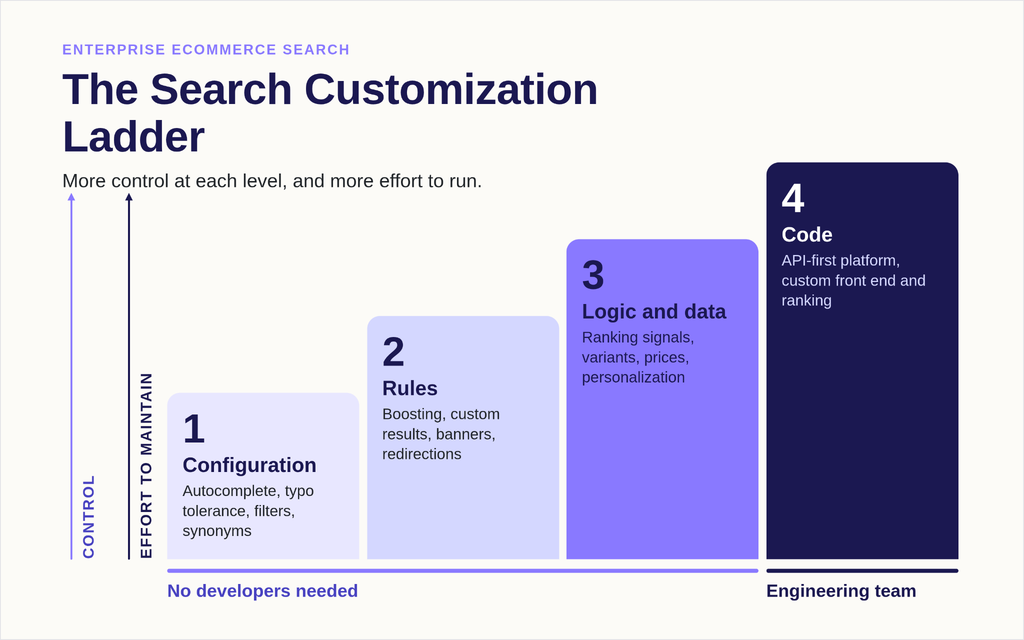
Think of search customization as four levels. Each one gives you more control over results and asks for more effort to run. Most growing stores need levels 1 and 2. Enterprise stores live at level 3 and occasionally need level 4.
Level 1: Configuration
This is what good regular site search gives you out of the box: autocomplete, typo tolerance, filters and synonyms. You choose settings; the engine does the rest.
You need more when: shoppers keep searching for things your catalog has, but under a different name, and your team has no way to push the right products forward.
Level 2: Rules
Rules let merchandisers change results without code. In Doofinder, this covers boosting rules, custom results, banners, redirections and out-of-stock handling. A boosting rule raises or lowers products by any attribute in your feed, such as brand, category, price or availability. It can apply everywhere or only when a shopper types a specific term, with exact or broad matching.
You need more when: your rules start multiplying, they conflict, or the logic behind them (stock, margin, sales velocity) changes faster than anyone can update them by hand.
Level 3: Logic and data
At this level you feed your own business logic into ranking and shape how the catalog is structured:
- Your own ranking signal. Doofinder accepts a per-product boost value, df_manual_boost, through the feed or the API. You can calculate it from stock, sales, newness or margin and send it nightly.
- Variants. Products that share a grouping ID collapse into one result, and you choose which variant fields (size, color, price) come back with it.
- Several prices per product. Price fields follow a price_{name} pattern, such as price_usd or price_member, for different currencies or customer groups.
- Multiple indices. One search engine can hold separate indices for products, pages and categories, searched together or one at a time.
- Personalization. Results adapt to each shopper’s behavior during their session (covered below).
You need more when: you want to replace the ranking model itself, build a fully custom front end, or run search across use cases far beyond product discovery.
Level 4: Code
Level 4 means building search as software: an API-first platform, your own front end, custom ranking models and engineers who maintain all of it. You get maximum control and take on maximum responsibility. Think of it as building your own car instead of tuning the one you have. We cover when that trade-off makes sense near the end of this guide.
For a deeper look at how ranking works under the hood, read our complete guide to ecommerce search algorithms.
Personalization challenges in enterprise ecommerce search
Personalization is customization at the level of the individual shopper. It is also where enterprise stores run into the most practical problems.
Challenge 1: Personalizing for anonymous shoppers
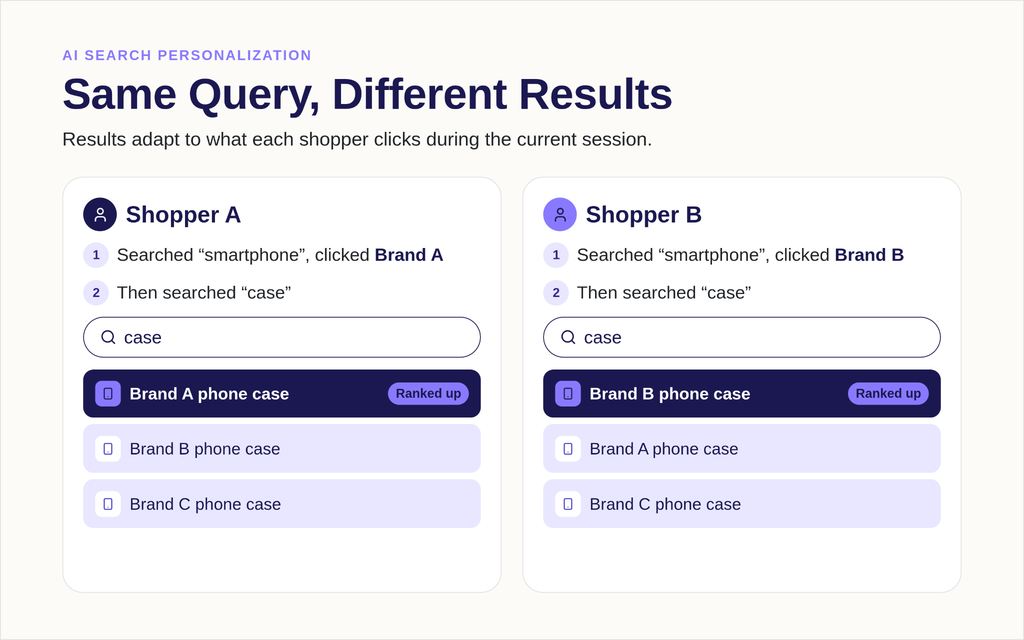
Most visitors are not logged in, so there is no purchase history to work from. The answer is to personalize within the session. Doofinder’s AI Search Personalization adjusts the score of the first 200 results based on what the shopper does during the current session, which lasts 12 hours. It weighs four parameters: title, price, brand and categories. If a shopper searches for a smartphone and clicks one brand, a later search for accessories shows that brand first.
For logged-in shoppers, the Search API accepts a persistent user_id alongside the per-visit session_id, which enables personalization across sessions.
Challenge 2: Personalization vs. merchandising rules
Your merchandising team wants a product at the top; personalization has other ideas. Decide which wins before you switch anything on. In Doofinder, each personalization parameter can be turned off individually, so you can, for example, stop personalizing by price while keeping brand and category.
Challenge 3: Tracking that actually works
Behavior-based ranking depends on clean event data. Doofinder’s documentation states that sending session events (search, click, add to cart) is required for accurate stats and for ranking that improves from user behavior. If you call the API from your own backend, forward each shopper’s real IP address. Otherwise all requests appear to come from one server address, can be flagged as bot traffic, and silently drop out of your reports. It’s the kind of bug nobody notices until the monthly report looks strangely quiet.
Challenge 4: Privacy and consent
Session-based personalization uses first-party behavior on your own site rather than third-party data, but it still has to respect your consent setup. Doofinder documents how to implement cookie consent for its services.
Challenge 5: Proving it works
Turn personalization on for a defined period, keep merchandising rules unchanged, and compare search conversion and click-through rate against the previous period with similar traffic.
Go deeper with our search personalization guide and ecommerce personalization benefits and examples.
Enterprise site search KPIs that tell you it’s time to customize more
Search KPIs are most useful when you read them as signals: each one points to a level of the ladder you are missing. In Doofinder, all of this data is available in the admin panel and through the Stats API, which returns sessions, top searches, click-through rates and conversion data.
| KPI | What it measures | When it’s weak, look at |
| Zero-results rate | Share of searches that return nothing | Level 1 to 2: synonyms, typo tolerance, redirections |
| Search click-through rate | Share of searches followed by a click on a result | Level 2: boosting rules, custom results |
| Search conversion rate | Share of searches that lead to a purchase | Level 3: ranking signals, variants, personalization |
| Average position of clicked results | How far down shoppers scroll before clicking | Level 2 to 3: the right products are there but ranked too low |
| Revenue from search | Sales attributed to search sessions | All levels: the business case for investing in search |
| Top queries without clicks | Searches that return results nobody wants | Level 1 to 2: mismatched synonyms or missing products |
How Doofinder scales customization as you grow
Doofinder covers levels 1 to 3 from the admin panel, without developers, and adds an API for the parts of level 4 most stores actually need. You can start with plug-and-play search and move up the ladder as your catalog and team grow.
Levels 1 to 3 without developers
Synonyms, redirections, boosting rules, custom results, banners, out-of-stock handling and personalization are all configured in the admin panel. Doofinder connects through plugins for Shopify, BigCommerce, Magento, WooCommerce, PrestaShop, Shopware, VTEX and other platforms, or through a data feed for custom stacks.
The search layer itself can be adapted too, with documented options for a custom product card template and CSS layer customization.
An API for when you need it
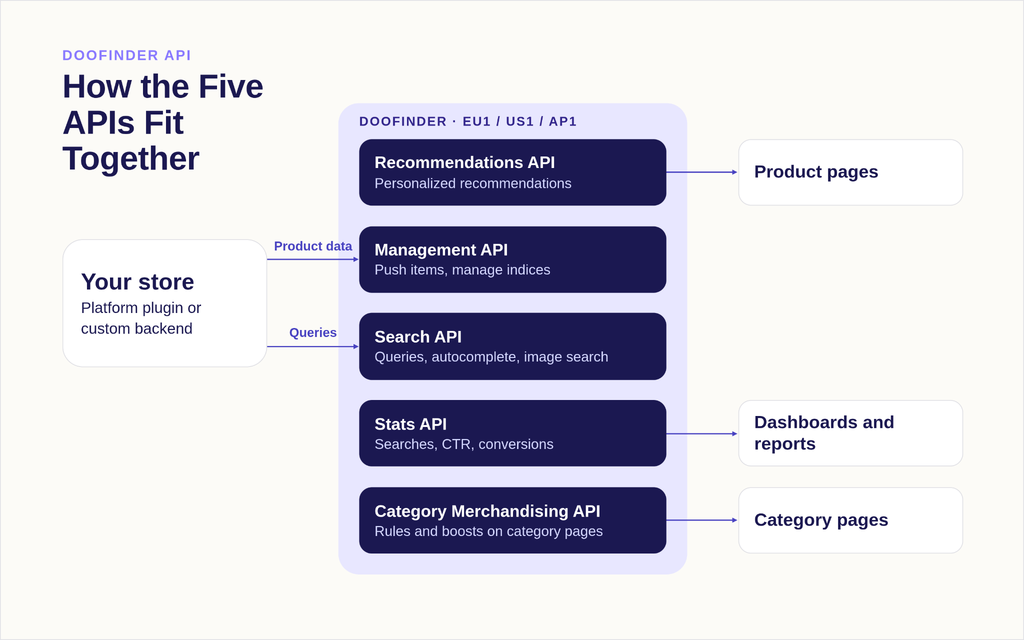
When your team wants to automate or build custom experiences, Doofinder offers five APIs:
| API | What you can do with it |
| Search API | Query indexed items, get autocomplete suggestions, run image search, log user interactions |
| Management API | Create and configure search engines, manage indices, push or update items |
| Stats API | Retrieve sessions, top searches, click-through rates and conversion data |
| Recommendations API | Serve personalized product recommendations |
| Category Merchandising API | Apply search rules and boosts to category pages |
Every API runs in one of three regions: Europe (eu1), the United States (us1) or Asia Pacific (ap1). The region is set by the hostname you call.
Built for large and complex catalogs
Two details in the Management API documentation matter at scale:
- Zero-downtime reindexing. For a full catalog replacement, such as a nightly sync, you write the catalog to a temporary index and then swap it with the live one. Shoppers keep searching the old index until the swap completes.
- Bulk updates. Bulk endpoints accept up to 100 items per request, so large catalogs are sent in batches.
For B2B and multi-audience stores, the support center documents how to show products only to specific users and how to display prices per customer group via multiprice, JavaScript or API integrations.
What Doofinder manages for you
Some settings are run by Doofinder rather than edited directly. The clearest example is relevance criteria, the order of tie-breaking fields after the relevance score. You can see the configuration in the panel, and Doofinder’s support team makes changes on request. For most merchants that means less to maintain. For teams that want to own every ranking parameter themselves, it is a real limit, and the next section covers the alternative.
When you need maximum customization: API-first search platforms
Some teams want to own every part of search. If that is you, an API-first platform such as Algolia gives you level 4 control, and it is worth being honest about where it goes further than Doofinder.
The clearest difference is the ranking formula itself. In Algolia, developers can reorder the tie-breaking criteria the engine uses and define custom ranking attributes, such as popularity or price, applied in the order they list them. Front ends can be built with its InstantSearch UI components, used as they are or fully customized. Algolia also powers search outside ecommerce, such as documentation sites. In Doofinder, by contrast, the order of relevance criteria is managed by the support team, and the platform is built specifically for online stores.
That control comes with responsibility. Ranking settings, index configuration and UI components live in code or configuration your team maintains, and every change needs someone who understands how they interact.
| Doofinder | API-first platforms | |
| Typical owner | Merchandising or ecommerce team | Engineering team |
| Ranking formula | Score plus rules and boosts; criteria order managed by support | Directly configurable by developers |
| Front end | Ready-made search layer, adjustable via templates and CSS | Built by your team from UI components or from scratch |
| Focus | Ecommerce only | Ecommerce plus other use cases |
A simple rule of thumb: if your requirements fit levels 1 to 3, a merchant-run platform gets you there faster and with less upkeep. If you need to rewrite how ranking works or build search into products beyond your store, an API-first platform is the better fit.
Comparing options in more depth? See our roundup of the 8 best ecommerce search engines.
Where to start: find your level, then test it
Most stores asking about enterprise search don’t need to jump to level 4. They need levels 1 to 3 working properly, plus a way to automate as the catalog grows. That’s the space Doofinder is built for.
Merchandisers manage synonyms, boosting rules and personalization from the admin panel, without waiting on a developer. When the store needs more, developers get five APIs, zero-downtime reindexing and bulk updates. Doofinder also offers 24/7 technical support and a 99.9% uptime guarantee.
It holds up in practice. Found Golf Balls, a store with countless product variants, now sees 17.3% of searches end in a purchase. SIM Yamaha switched from SearchSpring and reports higher sales at a significantly lower monthly cost.
See it on your own catalog. Start a 15-day free trial, or talk to our team about the Enterprise plan for larger catalogs and custom integrations.
Frequently Asked Questions
It is site search built for large or complex online stores: big catalogs, product variants, several prices or audiences, and merchandising teams that need control over results. The main difference from regular site search is how much of the ranking logic and data you can customize.
Regular site search works on default settings and a few synonyms. Enterprise site search adds rules by attribute and query, your own ranking signals, variant grouping, personalization, customer-group pricing and API access for automation.
No. Enterprise search helps employees find internal information such as documents and emails. Enterprise ecommerce search helps shoppers find products on a store and is measured on clicks, conversions and revenue.
Start with the cause. Zero results usually call for synonyms and typo tolerance. Repeated variants call for grouping. Products that rank high but don’t sell call for availability rules or a custom boost built from stock, sales and margin data.
Track zero-results rate, search click-through rate, search conversion rate, average position of clicked results and revenue from search. Each points to a different level of customization you may be missing.
When you need to change the ranking formula itself, build a fully custom front end, or run search across products beyond your store, and you have an engineering team to maintain it.