
eCommerce API integration is one of those topics that sounds more complicated than it needs to be. At its core, it’s about connecting your store to the tools and services that make it work, payment processors, shipping providers, marketing platforms, search engines.
Most stores rely on dozens of these connections without their teams fully understanding how they function or what happens when they break. This article cuts through that. It covers how eCommerce integrations actually work, where search fits into the picture, and what to watch out for when evaluating your options.
What Ecommerce Integration Actually Does
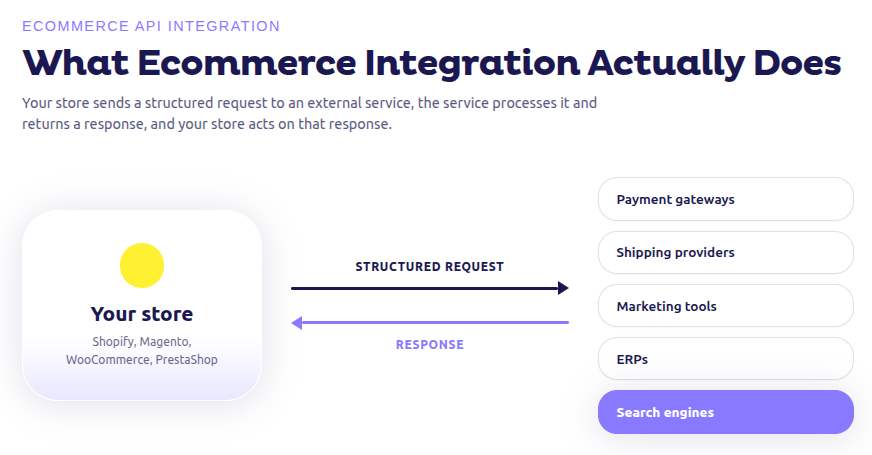
An API (Application Programming Interface) is how two software systems exchange data. Your store platform doesn’t run in isolation. It connects to payment gateways, shipping providers, marketing tools, ERPs, and search engines through ecommerce apis. These are the pipes that hold everything together.
The pattern is consistent across every ecommerce integration: your store sends a structured request to an external service, the service processes it and returns a response, and your store acts on that response. What changes is what you’re sending, what you get back, and how often it needs to happen.
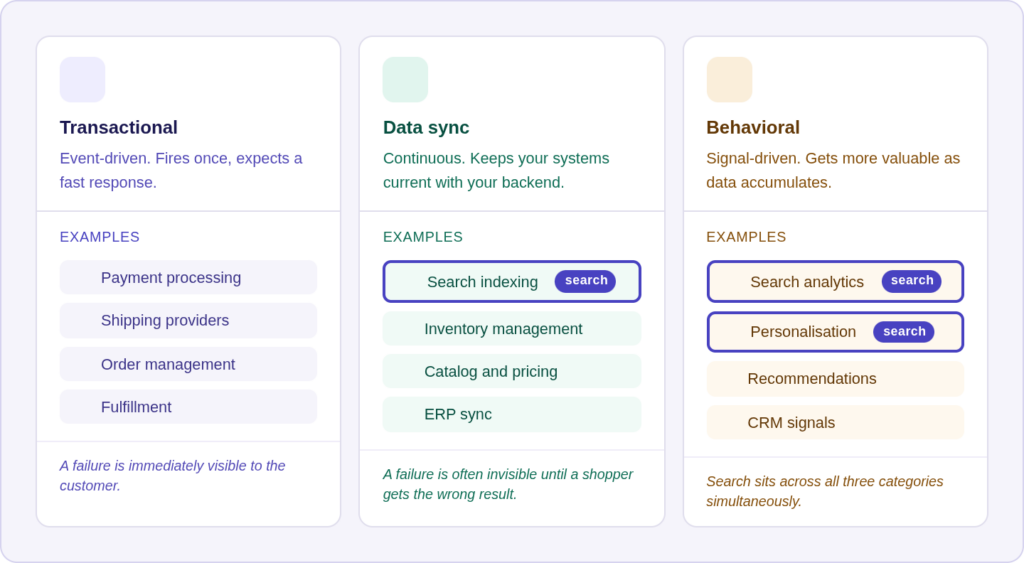
There are three broad categories of ecommerce API integration worth understanding:
Transactional integrations cover things like payment processing, order management, and fulfillment. They fire on specific events and expect a fast, reliable response. A failed payment API call is immediately visible to the customer.
Data sync integrations cover inventory management, product catalog updates, pricing, and search indexing. These run continuously or on a schedule and need to stay current with your backend. A failure here is often invisible until a shopper searches for a product and gets the wrong result.
Behavioral integrations cover analytics, personalization, and recommendations. These consume behavioral signals from your storefront and use them to improve future responses. They tend to get more valuable over time as the data accumulates.
Search sits across all three. It needs transactional speed at query time, continuous data sync to stay current, and behavioral signals to improve relevance. That combination is why search api integration is more complex than most other ecommerce integrations you’ll run.

Why Search Is Different From Other Ecommerce Integrations
Payment and shipping integrations are event-driven. A transaction fires, an api call happens, the response confirms success or failure. Done.
Search doesn’t work like that. It’s continuous. Your catalog changes constantly. Prices shift, stock moves, new products go live, old ones get discontinued. The search index needs to reflect all of it, in close to real time. Without real-time ecommerce data flowing into the index, your search results go stale and shoppers stop trusting them.
The average eCommerce store has a 15% zero-results rate on search. For stores using Doofinder, that average drops below 1%.
There’s also the intent problem. A shopper searching for “waterproof trainers” doesn’t type those exact words into every search. They type “rain shoes,” “all-weather sneakers,” “weatherproof running shoes.” A search engine that only matches exact strings will fail all of those queries. Handling this requires synonym management, stemming, and intent modeling at the indexing layer — the same mechanics behind how eCommerce search algorithms work. It’s not something you can patch with a data fix after the fact.
This is the problem search api integration is actually solving. Get it right and your search reflects your real catalog with intelligent matching. Get it wrong and nothing else you do will fix it.
The Four Layers of Search API Integration
Catalog sync: what you push and why it matters
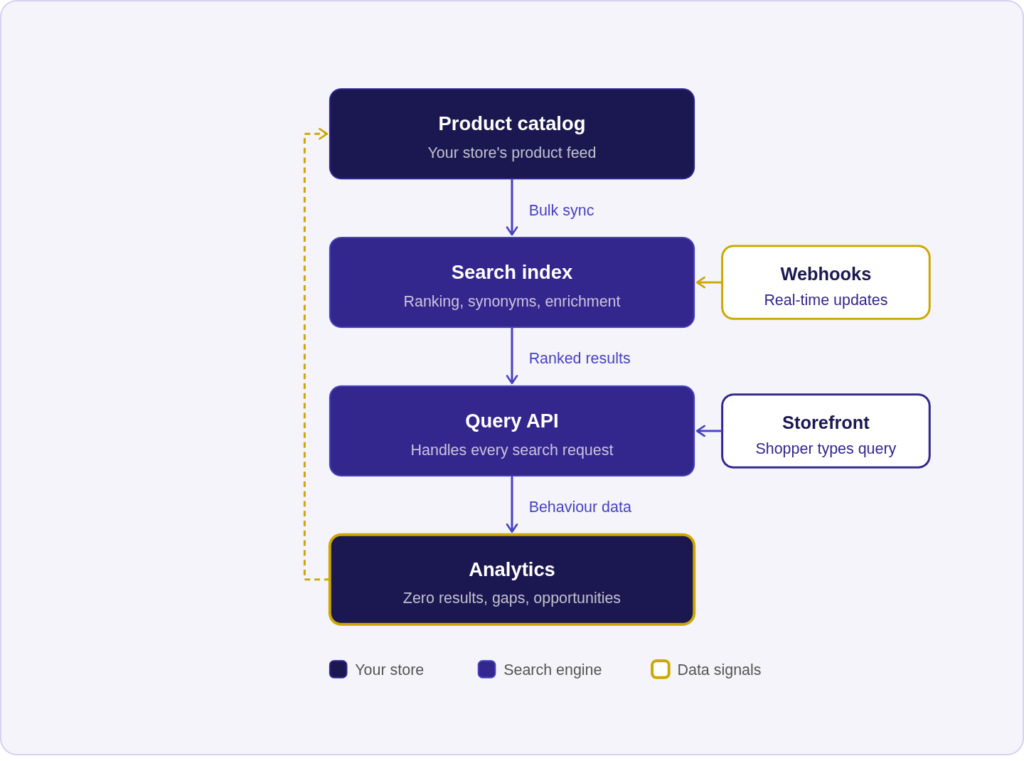
The first step is pushing your product data to the search engine. This usually happens in two ways: an initial bulk sync that loads your entire catalog, and ongoing incremental updates as things change.
What you include in that sync matters more than most stores realize. Title and price are obvious. But attributes like stock level, margin, brand, categories, material, color, and size are what make smart merchandising possible. If those fields aren’t in the index, you can’t use them for sorting logic, boosting, or filtering later on.
This is where a lot of stores underinvest. They sync the basics and wonder why their merchandising rules feel limited. The index only knows what you tell it. If you never pass margin data, you can’t surface high-margin products first. If you don’t pass stock levels, you can’t automatically demote out-of-stock items.
What good catalog data looks like:
A well-structured product record for a search index includes the product name, full description, all category paths (not just the primary one), price, sale price, stock status, brand, all variant attributes, and any custom fields relevant to your business such as margin or supplier. Images matter too. Doofinder’s Visual Tagging feature analyzes product images and extracts attributes automatically, which enriches the index even when your catalog data is thin. A jacket image gets tagged with color, style, and material without anyone manually entering those fields.
The sync frequency question:
Batch sync runs on a schedule: hourly, daily, or on demand. It’s simple to implement but means your index is always slightly behind your actual catalog. Real-time sync via webhooks fires immediately when something changes in your backend. When a product goes out of stock, a webhook triggers an index update within seconds. Shoppers searching minutes later won’t see it in results.
For most stores, the right answer is both: a nightly full sync to catch anything that slipped through, plus webhooks for high-frequency changes like stock and pricing.
Indexing: what happens after you push data
Once you’ve pushed data, the search engine processes it. This is the step most eCommerce managers know least about, and it’s where most search quality problems actually originate.
Tokenization breaks product text into searchable tokens. “Waterproof running jacket” becomes [“waterproof”, “running”, “jacket”] and also [“waterproof running”, “running jacket”] depending on the engine’s n-gram configuration. This is why a search for “running jacket” finds products even if those exact two words don’t appear together in the title.
Stemming reduces words to their root form. “Running,” “runs,” and “runner” all stem to “run.” This means a search for “running shoes” can match products titled “run shoe” or “runner’s footwear.” Without stemming, minor word variations cause zero results.
Synonym expansion maps equivalent terms to each other. “Trainers” and “sneakers” mean the same thing to a shopper but might appear differently in your catalog. Synonym management is ongoing work, not a one-time setup. The queries your shoppers use evolve, and your synonym lists need to evolve with them.
Relevance scoring determines which matching products rank higher. A basic search engine ranks by text match frequency. A sophisticated one factors in behavioral signals (what products shoppers actually click and buy after this query), business rules (boost high-margin products, demote out-of-stock ones), and recency. For a deeper look at how this plays out in practice, the search relevance guide covers the mechanics in detail.
With a managed ecommerce integration service you don’t configure tokenization and stemming by hand. What you do control is the quality of the data you put in and the merchandising rules you apply on top. A clean, complete product feed consistently produces better search quality than a sparse one, because the engine has more signals to work with.
Query API: what your storefront sends and receives
This is what your storefront calls on every search. The shopper types something, your front end sends the query to the ecommerce api, and it returns ranked results based on relevance and your configured merchandising rules.
A basic query sends a search string and gets back a list of matching products. A well-configured query sends much more: the search string, active filters (brand, price range, color), the shopper’s session context for personalization, the current page for pagination, and any active campaign rules like promotional boosts.
The response is equally rich. It includes the ranked product list, facets for filtering (the counts next to each filter option), query suggestions for autocomplete, related searches, and any banner or redirect rules you’ve configured. If you’re unfamiliar with the filtering layer, faceted search in eCommerce is worth reading before you configure this part of your integration.
What goes wrong at the query layer:
The most common failure is over-filtering. A shopper selects “blue” and “under €50” and gets zero results, not because no such product exists, but because the filter logic is too strict. Good search platforms handle this gracefully by showing near-matches and relaxing filters progressively rather than returning a dead end. How you design and present a no results page matters more than most teams realize — it’s the difference between a shopper trying again and a shopper leaving.
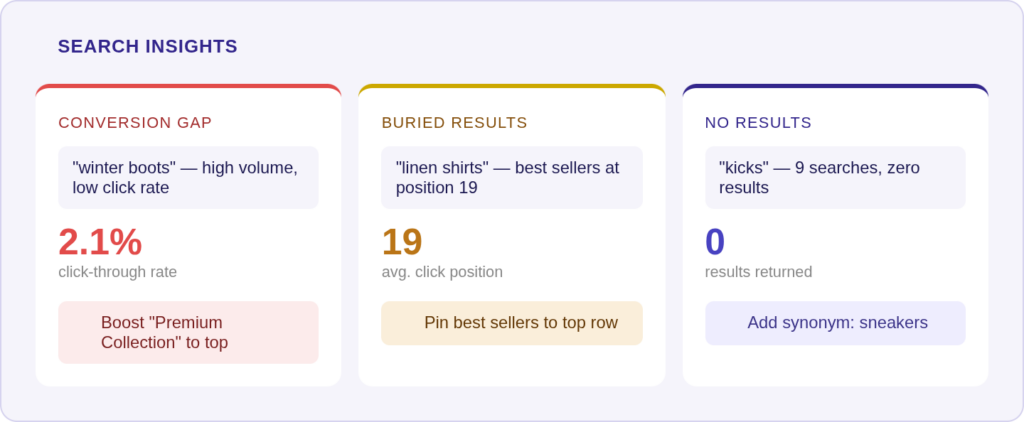
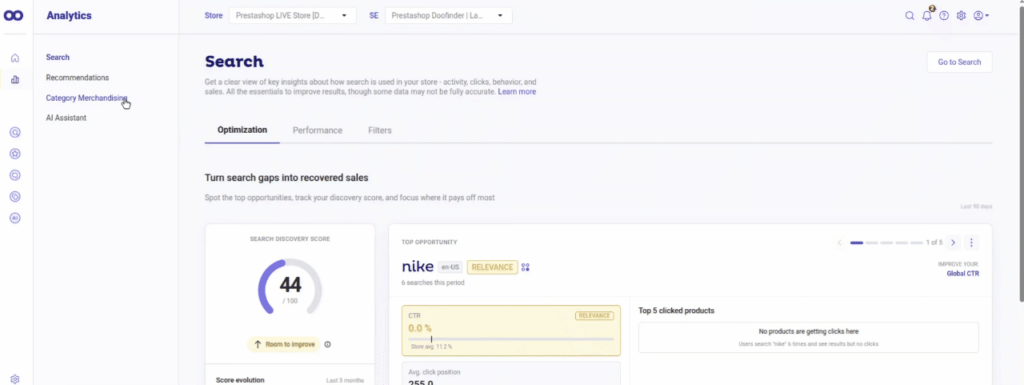
The second most common failure is buried results. Doofinder’s analytics dashboard surfaces this directly. “Linen shirts” averaging position 19 in results means your best linen shirts are effectively invisible. Shoppers don’t scroll to page two. Pinning those products to the top row takes about thirty seconds in the admin panel.
Concrete examples from real stores: “Kicks” returning zero results because the catalog uses “sneakers” — solvable with a synonym in about two minutes. “Winter boots” generating high search volume but low click-through because the wrong products are ranking first. Solvable by adjusting the boost rules. These are not edge cases. They show up constantly in stores that haven’t connected their search analytics to their merchandising decisions.
Analytics: turning search data into decisions
Search data is the closest thing you’ll get to a real-time map of customer intent. Every query, click, add-to-cart, and conversion gets tracked. The patterns tell you what your catalog isn’t serving, which terms need synonyms, and which products deserve higher placement. A proper search engine analytics setup turns this from a reporting exercise into an active merchandising tool.
The three signals worth monitoring consistently:
Zero-result queries tell you about catalog gaps or terminology mismatches. High-volume zero-result queries are immediate opportunities: either the product doesn’t exist (a content or inventory decision) or the synonym mapping is missing (a five-minute fix).
Conversion gaps are high-volume queries with low click-through or purchase rates. The query is popular, something is returning, but shoppers aren’t buying. Usually this means the wrong products are ranking first.
Buried results are products that rank too low to get seen. If your best-margin product for a key query is averaging position 15, you’re leaving money on the table. Boosting it costs nothing and takes seconds.
Wired 4 Signs USA sees 17x higher purchase likelihood when sessions involve search. FoundGolfballs drives 45% of total revenue through search. SempreFarmacia runs a 13.8% conversion rate on search sessions. Those numbers reflect stores that actively use search data to improve their merchandising, not stores that just turned search on and walked away.
See It in the Actual API
Everything above maps directly to Doofinder’s live API. If you want to see the real request and response formats instead of just the concepts:
Everything above maps directly to Doofinder’s live API. If you want to see the real request and response formats instead of just the concepts:
Search API: the endpoint your storefront calls on every query, including filters, facets, autocomplete, and image search.
Management API: how catalog sync and indexing actually work, pushing, updating, and configuring items and search engines programmatically.
Stats API: the analytics layer, covering sessions, top searches, click through rates, and conversion data.
Quick Start guide: get your first real API call running in under 5 minutes, with working cURL, Python, and JavaScript examples.
Platform-Specific Ecommerce Integration
The integration mechanics are the same across platforms but the implementation path varies.
Shopify stores connect via the Doofinder app. The product feed syncs automatically from your Shopify catalog. No webhook configuration required. Merchandising rules, synonym management, and campaign setup all happen in the Doofinder admin.
WooCommerce stores use the Doofinder plugin for WordPress. If you’re looking to integrate an ecommerce search api into WooCommerce specifically, the plugin handles catalog sync and the search layer without touching your theme files.
PrestaShop and BigCommerce both have dedicated modules that manage the catalog sync and front-end integration. Custom attribute mapping, including margin and supplier fields, is available in the feed configuration.
Headless and custom implementations use the API directly. You build the catalog sync pipeline, configure webhooks, and make query api calls from your front end. More flexibility, more setup. This is the path for teams with non-standard architectures or complex multi-store setups.
Build vs. Buy: What the Decision Actually Comes Down To
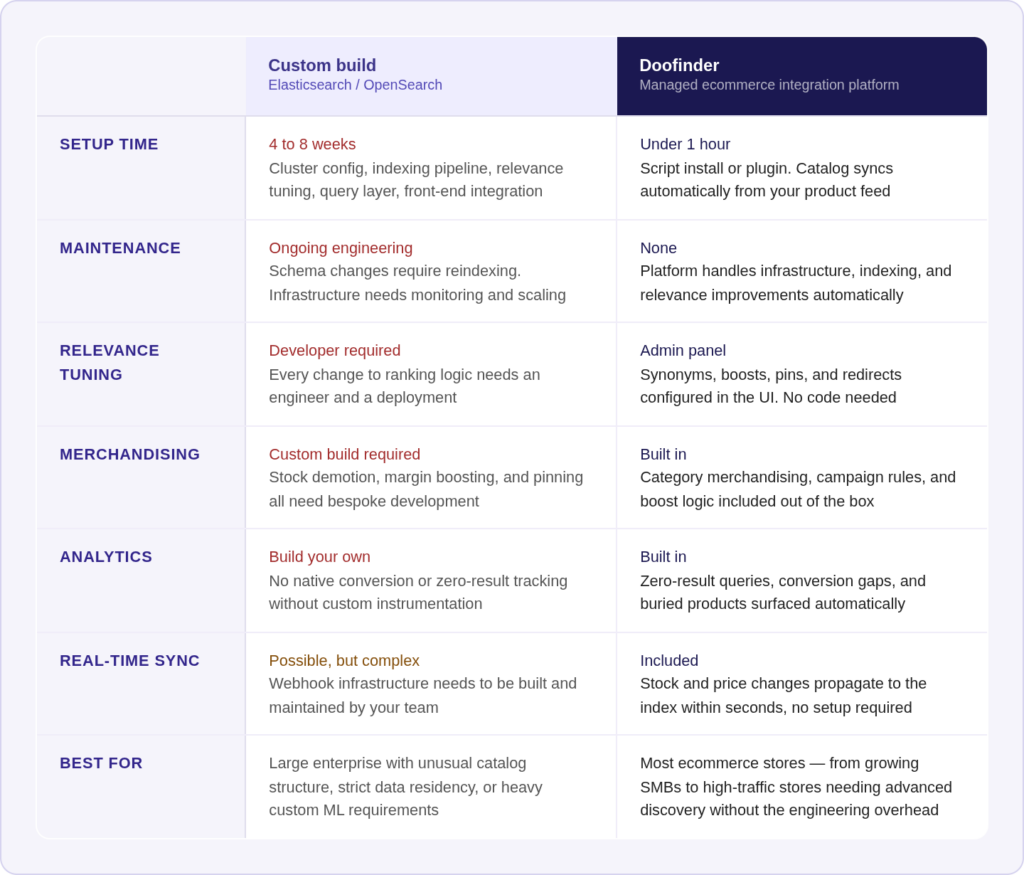
Some teams consider building their own search on top of Elasticsearch or OpenSearch before evaluating a managed ecommerce integration solution. It’s worth being clear about what that involves.
Building custom search:
Getting a basic Elasticsearch cluster running takes a day or two. Getting it to a production-ready state, with proper relevance tuning, synonym management, synonym expansion, faceted filtering, and analytics, takes weeks. Most engineering estimates undercount the ongoing maintenance: index schema changes require reindexing, relevance models need tuning as catalogs evolve, and infrastructure needs monitoring and scaling.
The real cost isn’t the initial build. It’s the ongoing ownership. Every new product attribute you want to use for merchandising needs an index schema update. Every relevance problem requires an engineer to diagnose and fix. Every infrastructure issue is your team’s problem.
Using a managed ecommerce api integration platform:
Catalog sync, indexing, query handling, and analytics are handled by the platform. Relevance improvements happen automatically as behavioral data accumulates. Synonym management, merchandising rules, and campaign setup happen in a UI without engineering involvement.
The tradeoff is customization. A managed platform has opinions about how things should work. If your requirements are unusual, such as very large catalogs with complex taxonomies, heavy custom ML requirements, or strict data residency constraints, those opinions might conflict with what you need. For the other 95% of stores, they don’t.
Ready to see it in action?
If you’re evaluating your search setup, Doofinder is worth a look. It handles the full integration stack from catalog sync and indexing to query API and analytics, out of the box, with no engineering required for most platforms. Stores on Shopify, WooCommerce, PrestaShop, and BigCommerce are typically live in under an hour.
What you get on day one: a search engine that stays in sync with your real catalog, intelligent matching that handles synonyms and intent out of the box, and an analytics dashboard that shows you exactly where revenue is being lost and what to do about it.
The average store sees a zero-results rate below 1%. Conversion rates on search sessions consistently outperform the rest of the site. And unlike a custom build, there’s nothing to maintain. Relevance improves automatically as behavioral data accumulates.
Start your free trial and have search running before the end of the day.
FAQ About Ecommerce API Integration
A set of protocols that let your store platform communicate with external services, including payment processors, shipping providers, search engines, and marketing tools, by sending and receiving structured data.
Your product catalog syncs to the search engine, the engine indexes and processes that data, and your storefront calls the query api on every search to get ranked results. Analytics from search sessions then feed back into merchandising decisions.
For most platforms including Shopify, WooCommerce, PrestaShop, and BigCommerce, no. Plugin and script-based installations handle the integration without any backend development. Api-based integration is for custom or headless implementations.
A product feed pushes your catalog data to an external system. The ecommerce api is what your storefront uses to query that data in real time. You need both: the feed keeps the index current, the api retrieves results.
Software that connects your store to external services and tools through apis. Some platforms handle a single integration type. Others, like Doofinder, cover an entire discovery layer including search, recommendations, categories, and conversational commerce.
For plugin-based integrations on Shopify, WooCommerce, or PrestaShop, setup typically takes under an hour. API-based integrations for headless or custom implementations take longer, usually a few days to a week depending on catalog complexity and the number of custom attributes you need to map.
Product and inventory data that updates your search index immediately when something changes in your backend, rather than on a batch schedule. Real-time sync means a product that goes out of stock at 2pm stops appearing in search results at 2pm, not the following morning.